> This is part 1 of 4 of the full documentation (pages 1–100 of 339).
> The content is paginated: fetch every part to see all of it.
> Next part: https://docs.raga.ai/llms-full.txt/1
> Page index: https://docs.raga.ai/llms.txt
# Welcome
Introduction of the RagaAI - An end to end testing platform for GenerativeAI and DiscriminativeAI models - LLM, Computer Vision, NLP and Tabular Data.
Welcome to RagaAI, a comprehensive AI testing platform that automatically detects issues, identifies root cause and empowers users to fix them effectively. This leads to a 3x acceleration in AI development lifecycle while reducing AI risk exposure by 90% in production.
RagaAI is a multi-modal platform that supports testing for Generative AI, Discriminative AI and Agentic Application:
* RagaAI Catalyst: Automated Test and Fix platform for LLM applications
* RagaAI Neo: Assess the performance, reliability, and effectiveness of Agentic AI systems
* RagaAI Prism: Multi-modal platform that supports testing for all compuster vision applications
### RagaAI Catalyst - Public Sandbox
RagaAI Catalyst is an automated Test and Fix platform for LLM applications. The RagaAI Catalyst Sandbox is publicly available [here](https://catalyst.raga.ai/signup)[.](https://catalyst.raga.ai/signup) The [Quickstart ](/ragaai-catalyst/user-quickstart)is available to help you navigate the platform and see its capabilities firsthand.
{% embed url="" %}
### RagaAI Prism - Public Sandbox
The RagaAI Prism is a comprehensive AI testing platform for Computer Vision appplications that automatically detects issues, identifies root cause and empowers users to fix them effectively. The RagaAI Prism Sandbox is publicly available [here](/ragaai-prism). The [Quickstart](/ragaai-prism/quickstart) and the [Sandbox Guide](/ragaai-prism) are also available to help you navigate the platform and see its capabilities firsthand.
{% embed url="" %}
# RagaAI Catalyst
The automated AI evaluation platform to build safe, reliable and cost efficient GenAI applications.
Deliver LLM Applications with confidence with RagaAI's automated testing platform
RagaAI Catalyst is an automated Test and Fix platform for LLM applications - ranging from LLMs and RAGs to Agentic Applications. With its state of the art automated metrics, it helps identify hallucinations, safety and security vulnerabilities as well as as cost concerns with GenAI applications. It empowers data science and developer teams with the tools and recommendations to identify issues in real-time and address them seamlessly.
**Key Features -**
* **Complete Production Observability:** Gain full visibility into your applications with real-time monitoring and analytics, ensuring immediate detection and correction of issues.
* **Robust Evaluation Framework:** Utilise powerful tools for evaluation during development, CI/CD, or production stages, enabling continuous improvement and optimisation.
* **Prompt Management and Experimentation:** Efficiently manage and experiment with prompts to optimise performance and achieve better results.
* **AI Performance**: This includes detection issues like hallucinations, poor prompt quality as well as issues with Information Retrieval in real-time with a 92% alignment with human evalaution.
* **Safety and Security:** RagaAI Catalyst provides multiple guardrails that can prevent issues such as Personally Identifiyable Information (PII) Leakage, Biased / Toxic Responses etc. in real time.
* **Experimentation and A/B Testing:** The platform allows developer teams to seamlessly collaborate on applications and iterate over choices (prompt templates, LLMs, hyperparametrs etc. ) for scientific comparison and optimial selection.
By providing the ability to text and fix in real time, RagaAI Catalyst enables AI teams to deliver reliable and safe LLM-powered applications faster and cheaper.
# User Quickstart
This guide will help you get started with RagaAI Catalyst using any sample dataset, straight from the RagaAI GUI or the Python environment.
{% embed url="" %}
{% hint style="info" %}
This Quickstart section demonstrates steps to get started on the Catalyst UI. For users trying to run Catalyst from their SDK, equivalent commands for each step mentioned below can be found in [this](https://colab.research.google.com/drive/1-Os-m_DTSnvpUhvqNoGnuyOOII7ni9YT?usp=sharing) Google Colab project.
{% endhint %}
**1.Sign Up and Authentication**
**1.1 Sign Up**
* Start by signing up for an account @ [https://catalyst.raga.ai/](https://catalyst.raga.ai/signup)
**1.2 Setup API Keys for LLM Access**
To start running evaluations on RagaAI Catalyst, you need specify the API keys to your LLM models. Follow these steps to set your API keys:
1. Navigate to Settings -> API Keys.
2. Enter your API key against the relevant supported model names by clicking "Edit". You can also setup keys for your custom gateways under the 'custom parameters' section.
3. Click "Save" to store the API Key(s).
**2.Create New Project**
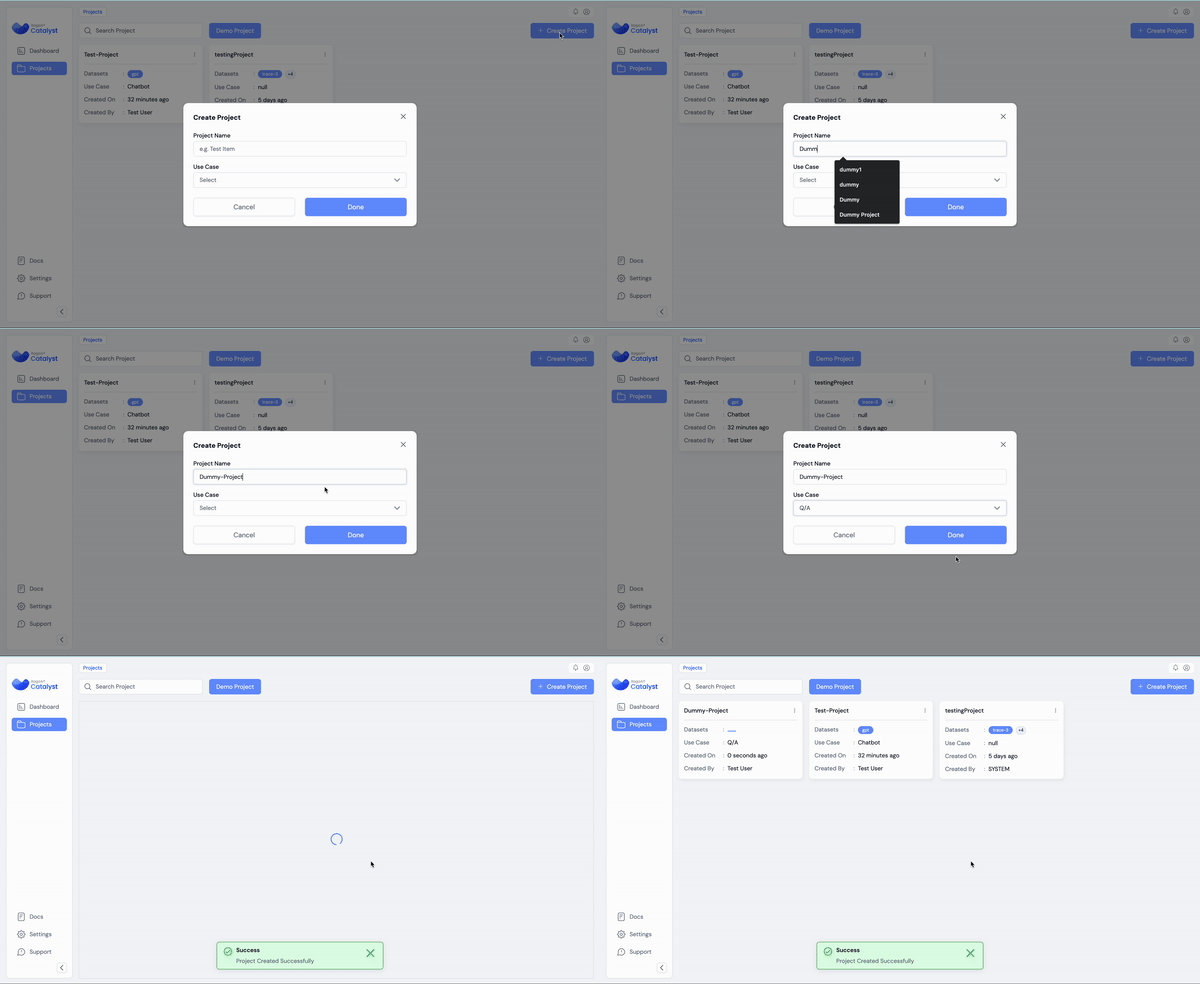
Create a new project for testing your LLM Application by clicking the "Create New Project" button on the platform homepage
**3. Upload Dataset**
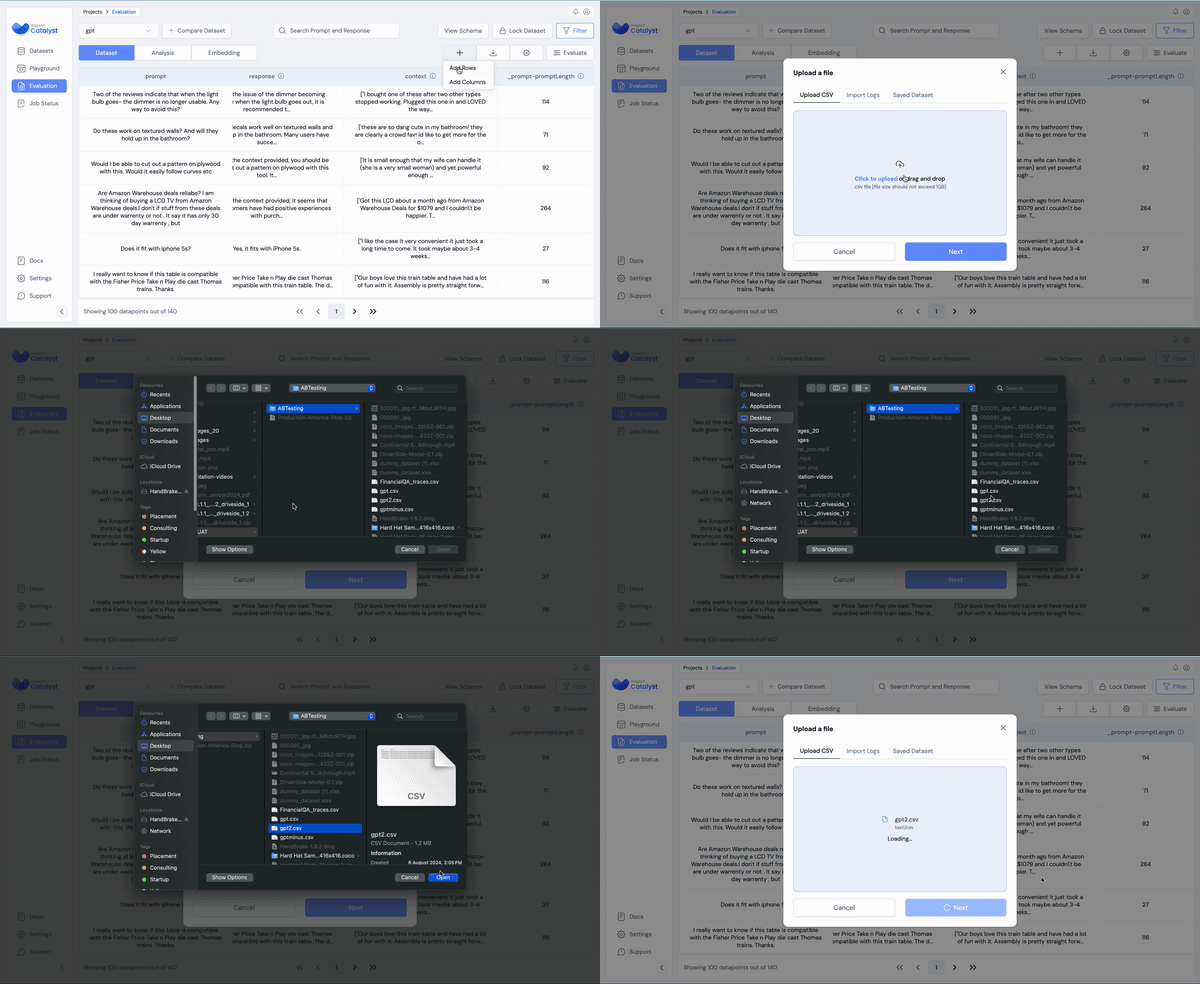
RagaAI Catalyst enables users to ingest data in two broad ways: real-time tracing and static uploads of data (CSV, Pandas, etc.). Here we'll upload a sample dataset via a CSV. For alternate methods, please refer to the [Uploading Data](/ragaai-catalyst/concepts/uploading-data) section.
{% file src="/files/0fp2BwreZWhlr0Dnzrem" %}
For further details on schema mapping and other CSV upload information, refer this [page](/ragaai-catalyst/concepts/uploading-data).
**4. Run Evaluations on the Datasets**
This can be implemented on the UI as follows. For further details on schema mapping and other evaluation related information, refer this [page](/ragaai-catalyst/concepts/running-ragaai-evals/executing-evaluations).
* Check out the list of [Supported metrics](/ragaai-catalyst/ragaai-metric-library).
5. **View Results - Dataset, Analysis and Embedding View**
You can go over the results for individual datapoints in the dataset view. **\[Project > Dataset > Dataset]**
For each metric computed on a datapoint, users can refer to the "Reasoning" column inside the datapoint view to understand the logic behind its calculation:
The **Analysis** tab is located within the following path: **\[Project > Dataset > Analysis]**
This section allows you to:
* View insights related to various metrics and response columns.
* Toggle between different metrics for analysis.
* Add, customize, or remove graphs for deeper insight.
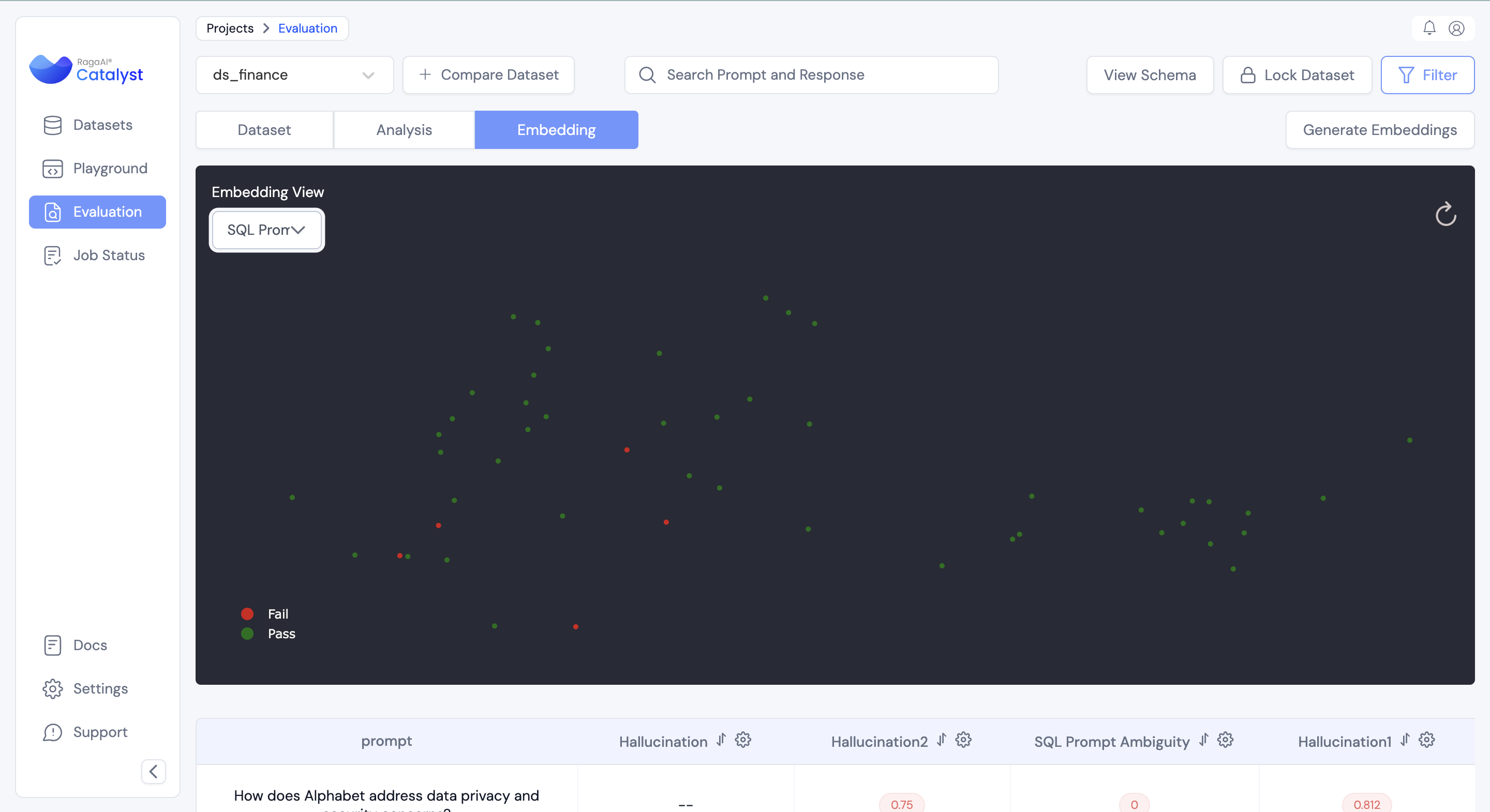
The **Embedding** tab is located within the following path: **\[Project > Dataset > Embedding]**
This section allows you to:
* Generate insights related to various metrics based on prompt embeddings
* Identify failure modes for the LLM application.
# Concepts
RagaAI Catalyst Concepts – GenAI Evaluation & Observability Overview
RagaAI Catalyst offers a cutting-edge evaluation and observability suite for GenAI applications. The complete user workflow of the application rests on a few basic concepts, which are highlighted below:
### **Projects**:
A Catalyst Project is the central hub where all datasets, experiments, evaluations, analyses, and comparisons are organised and stored. Projects can be likened to enterprise use-cases, meaning all evaluations and experiments related to different use-cases can have their separate space within the application.
### **Datasets**:
Catalyst Datasets can be thought of like spreadsheets. These allow for a row-and-column view of your uploaded/traced data. Typically, these are structured with rows containing individual prompts, and each column containing related data, for e.g, context, response, metrics computed, metadata, etc. As with spreadsheets, users can add rows (more data) and columns (new evaluations) to the dataset dynamically.
### **Traces**:
Traces refer to the real-time logs of a deployed GenAI application. RagaAI Catalyst allows SDK-based tracing of LLM inferences in real-time via SDK commands (for more details, refer this [page](/ragaai-catalyst/agentic-testing/concepts/tracing)).
### **Metrics/Evals**:
Metrics are quantitative measures used to assess various aspects of application performance. They can include Hallucination, Response Completeness, Context Precision, Toxicity, etc. Metrics help you understand how well your applications are performing and where improvements may be needed.
# Configure Your API Keys
Set API keys for your LLM models to enable metric evaluations on the Catalyst platform. If you're trying to set up a custom gateway, refer the "Enable Custom Gateway" page.
### Via UI:
To start running evaluations on RagaAI Catalyst, you need specify the API keys to your LLM models. Follow these steps to set your API keys:
1. Navigate to Settings -> API Keys.
2. Enter your API key against the relevant supported model names by clicking "Edit"
3. Click "Save" to store the API Key(s).
### Via SDK:
Alternatively, you can also define your API keys on the SDK using the following commands:
```python
from ragaai_catalyst import RagaAICatalyst
catalyst = RagaAICatalyst(
api_keys={"OPENAI_API_KEY": OPENAI_API_KEY} #similarly for other supported keys
)
```
# Supported LLMs
Supported LLMs – Compatible Models in RagaAI Catalyst
This page lists the Large Language Models (LLMs) that work with **RagaAI Catalyst**, how to connect them, and when to choose one provider over another. You’ll also find a quick compatibility matrix, limits to be aware of, and FAQs.
### How to connect a provider (2-minute setup)
* Go to **Settings → API Keys** in Catalyst.
* Click **Add Key**, choose the provider, and paste your API key or credentials.
### Choosing the right model
* **Rapid prototyping / lowest latency:** start with lightweight models (e.g., “mini/flash” tiers).
* **Complex reasoning / tool orchestration:** choose higher-end models (e.g., GPT-4.x, Claude 3.x).
* **Enterprise hosting requirements:** prefer **Azure OpenAI** or **AWS Bedrock**.
* **Long context / multimodal inputs:** consider **Gemini** or **Claude 3.x** with extended context windows.
{% content-ref url="/pages/i7wyPYO197z3IUuAqA2K" %}
[OpenAI](/ragaai-catalyst/concepts/supported-llms/openai)
{% endcontent-ref %}
{% content-ref url="/pages/s0dsyFET4TGsIDSJgksW" %}
[Gemini](/ragaai-catalyst/concepts/supported-llms/gemini)
{% endcontent-ref %}
{% content-ref url="/pages/A0YeghdjgD5027i7Cc85" %}
[Azure](/ragaai-catalyst/concepts/supported-llms/azure)
{% endcontent-ref %}
{% content-ref url="/pages/cn2VU5euO39HIUieTiON" %}
[AWS Bedrock](/ragaai-catalyst/concepts/supported-llms/aws-bedrock)
{% endcontent-ref %}
{% content-ref url="/pages/5DCLAnoUKqyujkdy1B0D" %}
[ANTHROPIC](/ragaai-catalyst/concepts/supported-llms/anthropic)
{% endcontent-ref %}
# OpenAI
OpenAI Integration – RagaAI Catalyst Supported LLM
By integrating your OpenAI API keys, you can unlock a range of powerful features in the platform, including:
1. **Generating responses to prompts in a dataset** – Automate the creation of text outputs (such as classification, summarisation, or creative writing) across large collections of data.
2. **Rapid experimentation in the Playground** – Quickly prototype, iterate, and test prompts in a user-friendly environment without the overhead of a production workflow.
3. **Using Large Language Models (LLMs) as a “judge” for metrics** – Leverage LLMs to evaluate and score the quality of generated outputs or compare different model outputs.
4. **Generating responses in production applications with guardrails** – Integrate LLM output directly into your product or system, while employing guardrails to ensure appropriate, safe, and reliable responses.
# Gemini
Google Gemini – RagaAI Catalyst Supported LLM
By integrating your Gemini keys, you can unlock a range of powerful features in the platform, including:
1. **Generating responses to prompts in a dataset** – Automate the creation of text outputs (such as classification, summarization, or creative writing) across large collections of data.
2. **Rapid experimentation in the Playground** – Quickly prototype, iterate, and test prompts in a user-friendly environment without the overhead of a production workflow.
3. **Using Large Language Models (LLMs) as a “judge” for metrics** – Leverage LLMs to evaluate and score the quality of generated outputs or compare different model outputs.
4. **Generating responses in production applications with guardrails** – Integrate LLM output directly into your product or system, while employing guardrails to ensure appropriate, safe, and reliable responses.
# Azure
Azure OpenAI – RagaAI Catalyst Supported LLM
By integrating your Azure keys, you can unlock a range of powerful features in the platform, including:
1. **Generating responses to prompts in a dataset** – Automate the creation of text outputs (such as classification, summarisation, or creative writing) across large collections of data.
2. **Rapid experimentation in the Playground** – Quickly prototype, iterate, and test prompts in a user-friendly environment without the overhead of a production workflow.
3. **Using Large Language Models (LLMs) as a “judge” for metrics** – Leverage LLMs to evaluate and score the quality of generated outputs or compare different model outputs.
4. **Generating responses in production applications with guardrails** – Integrate LLM output directly into your product or system, while employing guardrails to ensure appropriate, safe, and reliable responses.
# AWS Bedrock
AWS Bedrock – RagaAI Catalyst Supported LLM
By integrating your AWS Bedrock, you can unlock a range of powerful features in the platform, including:
1. **Generating responses to prompts in a dataset** – Automate the creation of text outputs (such as classification, summarization, or creative writing) across large collections of data.
2. **Rapid experimentation in the Playground** – Quickly prototype, iterate, and test prompts in a user-friendly environment without the overhead of a production workflow.
3. **Using Large Language Models (LLMs) as a “judge” for metrics** – Leverage LLMs to evaluate and score the quality of generated outputs or compare different model outputs.
4. **Generating responses in production applications with guardrails** – Integrate LLM output directly into your product or system, while employing guardrails to ensure appropriate, safe, and reliable responses.
# ANTHROPIC
Anthropic Claude – RagaAI Catalyst Supported LLM
By integrating your Anthropic keys, you can unlock a range of powerful features in the platform, including:
1. **Generating responses to prompts in a dataset** – Automate the creation of text outputs (such as classification, summarisation, or creative writing) across large collections of data.
2. **Rapid experimentation in the Playground** – Quickly prototype, iterate, and test prompts in a user-friendly environment without the overhead of a production workflow.
3. **Using Large Language Models (LLMs) as a “judge” for metrics** – Leverage LLMs to evaluate and score the quality of generated outputs or compare different model outputs.
4. **Generating responses in production applications with guardrails** – Integrate LLM output directly into your product or system, while employing guardrails to ensure appropriate, safe, and reliable responses.
# Catalyst Access/Secret Keys
Generate access and secret keys and quickly integrate Catalyst within your application's SDK flow.
### Via UI:
To generate a pair of Catalyst Access and Secret Keys, simply:
1. Navigate to Settings -> Authenticate.
2. Click on "Generate New Key".
3. Use the copy buttons against each key and easily paste in your Python environment.
### Via SDK:
This feature is currently supported only on the UI.
# Enable Custom Gateway
Run metric evaluations on your own LLM models, even if you use a custom gateway.
### Via UI:
To enable your custom LLM gateway for metric evaluations on RagaAI Catalyst, you need to follow these steps:
1. Navigate to Settings -> API Keys and scroll down to the **Custom Parameters** section.
2. Enter the relevant deployment values for the following two custom key parameters:
1. api\_base - Your relevant server link
2. model - Name of the model to be used for metric evaluation
3. Click "Add" to save the variables within your Catalyst instance
You are now ready to run evaluations using this gateway. Simply choose "custom\_gateway" in the dropdown for "Model" when triggering your metric evaluations (learn how to run an evaluation here).
### Via SDK:
This action is currently supported on the UI only.
# Uploading Data
Understand the process of creating a new project and importing your dataset, including file format requirements and tips to prepare your data for effective LLM testing in the platform.
The **Datasets** section in RagaAI Catalyst allows users to import their datasets into the platform through various modes.
There are three modes for uploading datasets:
1. **Upload via CSV**
2. **Logging via Traces**
3. **Using Existing Demo Datasets:** RagaAI Catalyst provides a collection of curated demo datasets that users can explore. These demo datasets are based on common use cases and allow you to familiarise yourself with the platform before uploading your own data.
# Create new project
Get started on evaluations by creating use-cases specific projects
### Via UI:
Create New Project
To begin using RagaAI Catalyst, you need to create a new project. Follow these steps to create a project via the UI:
1. Navigate to the **projects section** in RagaAI Catalyst.
2. On the project page, click the **Create New Project** button.
3. In the popup window, enter a name for your project.
4. Select the use-case of your LLM Application from the dropdown. Currently supported use cases include:
* **Chatbot**: For running chat-level evaluations on complete human-AI conversations
* **Text2SQL**: For AI generated SQL-based response evaluations
* **Q/A** (Default): Standard RAG prompt-context-response based evaluations
* **Code Generation**: For evaluations on AI generated code
5. Click **Done** to finalise the creation of your new project.
### Via SDK:
You can also create project using the Python SDK with the following command structure:
```python
from ragaai_catalyst import RagaAICatalyst
project_name = 'your-project-name'
project = catalyst.create_project(
project_name=project_name,
usecase="Chatbot" #default usecase Q/A
)
```
Supported 'usecase' values are as listed above, and case sensitive.
Once created, projects can be listed using the following command:
```python
catalyst.list_projects()
```
# RAG Dataset
Once your project is created, you can upload datasets to it for evaluation.
### Via UI:
Upload Via CSV
1. Open your **Project** from the Project list.
2. It will take you to the **Dataset** tab.
3. From the options to create new dataset, select **"Upload via CSV"** method
4. Click on the upload area and browse/drag and drop your local CSV file. Ensure the file size does not exceed 1GB.
5. Enter a suitable name and description \[optional] for your dataset.
6. Click **Next** to proceed.
Next, you will be directed to map your dataset schema with Catalyst's inbuilt schema, so that your column headings don't require editing.
Here is a list of Catalyst's inbuilt schema elements (definitions are for reference purposes and may vary slightly based on your use case):
Schema Element
Definition
traceId
Unique ID associated with a trace
metadata
Any additional data not falling into a defined bucket. User has to define the type of metadata [numerical or categorical]
cost
Expense associated with generating a particular inference
expected_context
Context documents expected to be retrieved for a query
latency
Time taken for an inference to be returned
system_prompt
Predefined instruction provided to an LLM to shape its behaviour during interactions
traceUri
Unique identifier used to trace and log the sequence of operations during an LLM inference process
pipeline
Sequence of processes or stages that an input passes through before producing an output in LLM systems
response
Output generated by an LLM after processing a given prompt or query
context
Surrounding information or history provided to an LLM to inform and influence its responses
prompt
Input or query provided to an LLM that triggers the generation of a response
expected_response
Anticipated or ideal output that an LLM should produce in response to a given prompt
timestamp
Specific date and time at which an LLM action, such as an inference or a response, occurs
### Via SDK:
This guide provides a step-by-step explanation on how to use the RagaAI Python SDK to upload data to your project. The example demonstrates how to manage datasets and upload a CSV file into the platform. The following sections will cover initialisation, listing existing datasets, mapping schema, and uploading the CSV data.
#### 1. Prerequisites
* Ensure you have the RagaAI Python SDK installed. If not, you can install it using:
```bash
pip install ragaai-catalyst
```
* You need secret key, access key and project name, which you can get by navigating to settings/authenticate on UI.
#### 2. Importing Required Modules
Import the `Dataset` module from the `ragaai_catalyst` library to handle the dataset operations.
```python
from ragaai_catalyst import Dataset
import pandas as pd
```
#### 3. Initialise Dataset Management
Initialise the dataset manager for a specific project. This will allow you to interact with the datasets in that project.
```python
# Initialize Dataset management for a specific project
dataset_manager = Dataset(project_name="demo_project")
```
Replace `"demo_project"` with your actual project name.
#### 4. List Existing Datasets
You can list all the existing datasets within your project to check what data is already available.
```python
# List existing datasets
datasets = dataset_manager.list_datasets()
print("Existing Datasets:", datasets)
```
This prints a list of existing datasets available in your project.
#### 5. Get the Schema Elements
Retrieve the supported schema elements from the project. This will help you understand how to map your CSV columns to the dataset schema.
```python
# Get the schema elements
schemaElements = dataset_manager.get_csv_schema()['data']['schemaElements']
print('Supported column names: ', schemaElements)
```
This step returns the available schema elements that can be used for mapping your CSV columns.
#### 6. Create the Schema Mapping
Create a dictionary to map your CSV column names to the schema elements supported by RagaAI. For example:
```python
pythonCopy code #Create the schema mapping accordingly
schema_mapping = {'sql_context': 'context', 'sql_prompt': 'prompt'}
```
In this case, the column `'sql_context'` in the CSV is mapped to `'context'` in the dataset, and `'sql_prompt'` is mapped to `'prompt'`.
#### 7. Upload the Dataset from CSV
Finally, use the `create_from_csv` function to upload the CSV data into the platform. Specify the CSV path, dataset name, and the schema mapping.
```python
# Create a dataset from CSV
dataset_manager.create_from_csv(
csv_path='/content/synthetic_text_to_sql_gpt_4o_mini.csv',
dataset_name='csv_upload31',
schema_mapping=schema_mapping
)
```
Replace the `csv_path` and `dataset_name` with your CSV file path and desired dataset name, respectively.
#### 8. Verifying the Upload
After uploading, you can verify the upload by listing the datasets again or checking the project dashboard.
```python
# List datasets to verify the upload
datasets = dataset_manager.list_datasets()
print("Updated Datasets:", datasets)
```
#### 9. Verifying the Upload
Navigate to Dataset tab inside your project to explore your dataset and run evals
Uploaded Dataset
# Chat Dataset
Guide for uploading chat datasets to RagaAI Catalyst
When uploading a chat dataset to RagaAI Catalyst, you can map your data columns to the appropriate fields in the Catalyst schema. This enables Catalyst to accurately interpret and analyze the data. The schema mapping interface provides flexibility in matching your dataset columns to Catalyst's requirements.
**Required Schema Fields**
At minimum, ensure that the following columns are mapped correctly:
1. **ChatID**: (Optional) A unique identifier for each conversation. If left blank, Catalyst will generate a unique ChatID for each entry.
2. **Chat**: This field contains the entire conversation history in JSON format, detailing the sequence of interactions between the assistant, user, system, and function calls.
**Optional Fields**
You can also add additional columns to provide more context, instructions, or metadata about the conversation. These optional fields include:
* **Instruction**: Any specific instructions or guidelines for handling the chat. This helps Catalyst understand the context or constraints of the conversation, ensuring that responses align with the provided rules.
* **Context**: Additional information related to the chat, such as prior interactions or specific user preferences, which can influence response behavior.
* **Metadata**: Any relevant metadata associated with the conversation, such as tags, sentiment, or session information. This data can include useful details about the conversation's origin, customer type, or other contextual information that helps Catalyst tailor responses effectively.
Each conversation entry should include a list of JSON objects where each object represents a message or system instruction in the chat. Below is an example of the expected structure:
| ChatID | Chat | | | | | | | | | | | | | | | | | | | | | | | | | | | | |
| ------ | ------------------------------------------------------------------------------------------------------------------------------------------------------------------------------------------------------------------------------------------------------------------------------------------------------------------------------------------------------------------------------------------------------------------------------------------------------------------------------------------------------------------------------------------------------------------------------------------------------------------------------------------------------------------------------------------------------------------------------------------------------------------------------------------------------------------------------------------------------------------------------------------------------------------------------------------------------------------------------------------------------------------------------------------------------------------------------------------------------------------------------------------------------------------------------------------------------------------------------------------------------------------------------------------------------------------------------------------------------------------------------------------------------ | - | ---------------------- | - | ----------------------------------------------------------------------------------------------------------------------------------------------------------------------------------------------------------------------------------------------------------------------------------------------------------------------------------------------------------------------------------------------------------------------------------------------------------------------------------------------------------------------------------------------------------------------------------------------------------------------------------------------------------------------------------------------------------------------------------------------------------------------------------------------------------------------------------------------------------------------------------------------------------------------------------------------------------------------------------------------------------------------------------------------------------------------------------------------------------------------------------- | - | ---------- | - | ------------------------------------------------------------------------------------------------------------------------------------------------------------------------------------ | - | ---------- | - | ---------------------------------------------------------------------------------------------------------------------------------------------------------------------------------------------------------------------- | - | ---------- | - | -------------------------------------------------------------------------------------------------------------------------------------------------------------------------------------------------------------------------------------------------------------- | - | ---------- | - | ----------------------------------------------------------------------------------------------------------------------------------------------------------------------------------------------------------------------------------------------------------------------------------------------------------------------------------------- | - | ---------- | - | ------------------------------------------------------------------------------------------------------------------------------------------------------------------------------------------------------------------------------------------------------------------------------------------------------------------------------------------------------------------------------------------------------------------------------------------------------------------------------------------------------------------------------------------------------------------------------------------------------------------------------------------------------------------------------------------------------------------------------------------------------------------------------------------------------------------------------------------------------------------------------------------------------------------------------------------------------------------------------------------------------------------------------------------------------------------------------------- | - | ---------- | - | ------------------------------------------------------------------------------------------------------------------------------------------------------------------------------------------------------------------------------------------------------------------------------------------------------------------------------------------------------------------------------------------------------------------------------------------------------------------------------------------------------------------------------------------------------------------------------------------------------------------------------------------------------------------------------------------------------------------------------------------------------------------------------------------------------------------------------------------------------------------------------------------------------------------------------------------------------------------------------------------------------------------------------------------------------------------------------------------------------------------------------------------------------------------------------------------------------------------------------------------------------------------------------------------------------------------------------------------------------------------------------------------------------------------------------------------------------------------------------------------------------------------------------------------------------------------------------------------------------------------------------------------- |
| Ch\_01 |
\[
{
"role": "system",
"content": "## Important: YOU MUST ALWAYS CALL THE MOST APPROPRIATE FUNCTION WITH APT PARAMETERS FOR ALL USER QUERIES IF RELEVANT. ## Instructions: You are a smart assistant (PLEASE DON'T USE words like I am AI assistant etc) who helps our customer Ramesh Singh, with their bus ticket queries. Ramesh Singh might ask in any language regarding their bookings. Your by default language is English only but be ready to understand different language and type in your answer only in that language. For your information ticket numbers (TIN) of Ramesh Singh is: KLM123456789. He booked those ticket 100000.0 minutes ago and current time is 2024-09-15 15:45:00. Strictly follow below rules. Rule 1. Information from function are always correct.Hence assistant should never change the answer based on customer's persuasion. Rule 2. Use above ticket number (if present) to interact with customer. If no ticket number is found due to payment uncompleted then call given function without any tin number. Don't answer anything which is not related to ticket booking from redBus. Rule 3. After each of your complete answer (except for queries related to bus operator cancellation) ask Ramesh Singh if he found your answer helpful or not. If he says that assistant's answer is helpful then just type ' | | ANSWER HELPED CUSTOMER | | '. Never ask a question like 'Please let me know if you need any further assistance with this ticket' etc etc. Ramesh Singh will eventually ask you for his query. Rule 4. Always start the conversation by greeting Ramesh Singh with his name along with his ticket number after that ask what kind of help he needs. Rule 5. Words like tin,TIN,ticket id refers to ticket number. Rule 6. If there is no ticket number then it means either payment process was unsuccessful or desired seat was not available even though payment was successful. If any amount has been deducted from customer account it will be refunded back to original source within 4-5 working days. Explain this entire statement to customer when needed. Rule 7. Always ask for email or mobile from customer. If customer gives no input or instructs you to use registered email/ mobile then call 'resend\_ticket\_details\_on\_mobile' or 'resend\_ticket\_details\_on\_email' without any argument. Rule 8. If customer has done booking related error and he has reported the error within 30 mins of booking then you can immediately type ' | | AGENT CALL | | ' with proper explanation to customer. Rule 9. If customer claims to receive call/emails from BO regarding ticket cancellation or boarding details change you can immediately type ' | | AGENT CALL | | '. Rule 10. Do not call a human agent based on customer direction initially. First, try to solve the customer's problem on your own. If you are unable to solve a customer query within two attempts, only then type ' | | AGENT CALL | | ' so that we can transfer the conversation to a live expert agent (please don't say I am transferring to human agent etc etc). Rule 11. If the customer asks the same question two times or expresses disagreement with your answer for two times, just type ' | | AGENT CALL | | ' so that we can transfer the conversation to a live expert agent. Rule 12. Always use functions (don't skip this) to generate a response for every customer query. If by chance you can't find proper function call with appropriate argument just inform Ramesh Singh that his request can't be fulfilled. Rule 13. Whenever you type ' | | AGENT CALL | | ', always ensure to also put a message stating the user will be connected to a live agent for query resolution. ## Important: ALWAYS CALL THE MOST APPROPRIATE FUNCTION WITH APT PARAMETERS FOR ANY USER QUERY IF RELEVANT."
},
{
"role": "user",
"content": "Can I change the seat for this booking?",
"topMatches": \[],
"timestamp": "2024-09-15 14:30:00"
},
{
"role": "function",
"name": "check\_if\_seat\_change\_is\_allowed",
"content": ""Seat change is not allowed for this booking as the travel date is within 24 hours."",
"args": "{'tin\_number': 'KLM123456789'}",
"timestamp": "2024-09-15 14:30:05"
},
{
"role": "system",
"content": "If the function output says seat change is not allowed, inform the customer that they cannot change the seat for this booking as the travel date is within 24 hours. If the customer insists, type ' | | AGENT CALL | | ' after two unsuccessful attempts to resolve the query.",
"timestamp": "2024-09-15 14:30:05"
},
{
"content": "I'm sorry, Ramesh Singh, but seat change is not allowed for your ticket KLM123456789 as the travel date is within 24 hours. Is there anything else I can help you with?",
"role": "assistant",
"totalTokens": "3444",
"timestamp": "2024-09-15 14:30:10"
},
{
"role": "user",
"content": "But I really need to change the seat. Can you please do something?",
"topMatches": \[],
"timestamp": "2024-09-15 14:32:30"
},
{
"content": "I understand your concern, Ramesh Singh, but unfortunately seat changes are not possible for this booking as the travel date is within 24 hours. Let me know if I can assist with anything else.",
"role": "assistant",
"totalTokens": "3444",
"timestamp": "2024-09-15 14:32:40"
},
{
"role": "user",
"content": "Can you try again?",
"topMatches": \[],
"timestamp": "2024-09-15 14:33:00"
},
{
"role": "function",
"name": "findout\_if\_agent\_call\_is\_required",
"content": ""agent call is required"",
"args": "{'intent': 'assistant is unable to solve user query within two attempts'}",
"timestamp": "2024-09-15 14:33:05"
}
]
|
Each chat entry contains multiple fields within each message object:
* **role**: Indicates the sender's role in the conversation. Values can be `system`, `user`, `assistant`, or `function`.
* **system**: Represents rules, guidelines, and instructions that the assistant must follow.
* **user**: Captures the customer's messages or queries.
* **assistant**: Represents the assistant's responses to the customer.
* **function**: Logs calls to specific functions that perform tasks or retrieve data relevant to the conversation.
* **content**: Holds the main text or instructions for the conversation.
* For `system` entries, this includes detailed instructions and rules for the assistant's behavior.
* For `user` entries, this is the actual query or message from the customer.
* For `assistant` entries, this field contains the response provided by the assistant.
* For `function` entries, this field captures the result or status of a function call and may include a description of the parameters used.
* **timestamp**: A timestamp for each message in the format `YYYY-MM-DD HH:MM:SS`.
* **totalTokens** (optional): Used for assistant entries to capture token usage, which may assist in analysis and optimization.
**Example Chat Breakdown**
Below is a breakdown of a sample conversation to illustrate the structure and flow:
1. **system**: Provides guidelines to the assistant, such as responding with appropriate function calls and following specific rules regarding the customer’s bus ticket query.
2. **user**: The customer asks, "Can I change the seat for this booking?"
3. **function**: The assistant calls `check_if_seat_change_is_allowed` to verify if a seat change is permissible.
4. **assistant**: Responds based on the function’s output, stating that seat change is not allowed within 24 hours of travel.
5. **user**: Insists on changing the seat.
6. **assistant**: Politely reiterates that a seat change cannot be made.
7. **user**: Asks the assistant to try again.
8. **function**: Calls `findout_if_agent_call_is_required` because the assistant cannot resolve the query within two attempts.
{% file src="/files/UgmyYhPhJvb6fGBPJbCn" %}
Sample CSV
{% endfile %}
This structured chat format enables RagaAI Catalyst to evaluate and analyze the flow of conversations effectively. Please ensure your dataset follows this format for seamless integration and analysis.
# Prompt Format
How to represent conversation prompts and responses when preparing your dataset, ensuring Catalyst correctly interprets each user query and assistant reply during evaluation.
In addition to uploading in chat format, users can upload conversations in a simplified **Prompt-Response format**, where each interaction is recorded in a single row. Catalyst will automatically structure the data into a full chat history, allowing users to access all functionalities for chat analysis and processing.
The Prompt-Response dataset should follow the schema below, with **Function**, **Timestamp**, and **Model Name** columns as optional fields:
| **Chat ID** | **Chat Seq** | **Prompt** | **Response** | **Function** | **Timestamp** | **Model Name** |
| ----------- | ------------ | ------------- | -------------------------------------- | ------------ | ---------------- | -------------- |
| 1 | 1 | Hello | Hi there! | N/A | 15-10-2024 10:00 | Model\_XYZ |
| 1 | 2 | What is AI? | AI stands for Artificial Intelligence. | N/A | 15-10-2024 10:01 | Model\_XYZ |
| 2 | 1 | Book a ticket | Your ticket has been booked. | | | Model\_ABC |
**Columns:**
1. **Chat ID** (Required): A unique identifier for each conversation, grouping all rows related to a single chat session.
2. **Chat Seq** (Required): A sequence number for each prompt-response pair within a chat session, maintaining the correct conversation flow.
3. **Prompt** : The message or query initiated by the user or customer.
4. **Response** : The assistant’s reply to the user’s prompt.
5. **Function** (Optional): The name of any function called in response to the prompt (e.g., `check_balance`, `book_ticket`). If no function is used, this field can be left empty or marked as "N/A".
6. **Timestamp** (Optional): The exact date and time of each interaction in the format `DD-MM-YYYY HH:MM`. This field can be left blank if precise timing is unnecessary for your analysis.
7. **Model Name** (Optional Metadata): The name or identifier of the AI model used to generate the response. This metadata allows tracking of different model responses and is optional.
{% file src="/files/ZhbT49bvfawWLrbF4PyP" %}
Sample CSV
{% endfile %}
# Logging traces (LlamaIndex, Langchain, etc.)
Learn how to log execution traces from LlamaIndex or LangChain into RagaAI Catalyst. Capture prompts, responses, and steps for easier debugging and evaluation.
Users can log traces from their real-time (production) applications by invoking the Catalyst Tracer from their SDK. This allows Catalyst to read inferences in real-time and log them for instant evaluations. This way, users can avoid downloading and uploading in batches.
The Catalyst Tracer can be enabled with the following commands:
```python
from ragaai_catalyst.tracers import Tracer
from ragaai_catalyst import (
RagaAICatalyst,
init_tracing
)
# Initialize Catalyst Object
catalyst = RagaAICatalyst(
access_key = "RNb1evdFRTKjb6I7bfhy",
secret_key = "HmFFbkNOoub7mIXAD3bhXJWdTF283dlBh6K1Ev3z",
base_url = "https://dev-ragaai.deephealthos.com/api"
)
# Start Tracing (Place this at the top of your code)
tracer = Tracer(
project_name="your-project-name",
dataset_name="your-dataset-name",
metadata={"key1": "value1", "key2": "value2"},
tracer_type="langchain"
)
init_tracing(catalyst=catalyst, tracer=tracer)
```
* If successful, you can view the logged dataset by navigating to Project\_Name -> Dataset\_Name
* Metrics can be run on logged datasets in the same fashion as for CSV uploads.
# Trace Masking Functions
Users can mask keywords and regex patterns using custom Python functions
While RagaAI Catalyst sits on-prem for complete data security, enterprises might want to redact certain information, keywords, or patterns from their traces logged on the system. This can be done using custom Python functions as follows:
* **Prerequisites**
Users need to define the relevant platform keys and Tracer object as usual:
```python
from ragaai_catalyst.tracers import Tracer
from ragaai_catalyst import (
RagaAICatalyst,
init_tracing
)
# Initialize RagaAI Catalyst
catalyst = RagaAICatalyst(
access_key="",
secret_key="",
base_url="https://catalyst.raga.ai/api"
)
# Setup tracing
tracer = Tracer(
project_name="",
dataset_name="",
tracer_type="langchain"
)
```
* **Defining Custom Masking Functions**
Users can define their custom Python logic to replace certain keywords with a redaction phrase as shown below:
```python
def masking_function(value):
# Mask specific medical symptoms
symptoms = ['Fever', 'Cough', 'Headache']
for symptom in symptoms:
# Case insensitive replacement using regex
value = re.sub(rf'\b{symptom}\b', '', value, flags=re.IGNORECASE)
return value
# Another sample masking function
def another_masking_function(value):
"""
Returns masked strings with dates and emails redacted
"""
# Mask dates in various formats (YYYY-MM-DD, MM/DD/YYYY, etc.)
value = re.sub(r'\b\d{4}-\d{2}-\d{2}\b', '', value)
value = re.sub(r'\b\d{1,2}/\d{1,2}/\d{4}\b', '', value)
value = re.sub(r'\b[a-zA-Z0-9._%+-]+@[a-zA-Z0-9.-]+\.[a-zA-Z]{2,}\b', '< REDACTED EMAIL ADDRESS>', value)
return value
```
* **Enabling Masking Function**
Lastly, users can pass the desired masking function (limited to one) to the initialized Tracer object using the `register_masking_function` method as follows:
```python
tracer.register_masking_function(masking_function)
init_tracing(catalyst=catalyst, tracer=tracer)
```
* **Running Your Application**
Your RAG application can be defined further as usual. Any LLM calls should be traced with the above masking logic applied.
# Trace Level Metadata
Add metadata as key-value pairs for your real-time trace logs
Users can add custom information to real-time traces, if needed. While open telemetry data is logged automatically, customer-specific metadata can be attached to individual traces on the go. This can be done using dedicated functions as follows.
**Step 1: Define Metadata Fields**
When initializing the RagaAI Catalyst tracer in your application, define the various metadata fields (key-value) you might require through the course of the complete flow. Only fields defined here can be edited further in the code.
In the above example, "name", "age", and "company" are the three metadata fields defined, which can be assigned values for each individual trace going ahead.
**Step 2: Update Metadata Fields**
Using the `add_metadata` method, users can update one or more metadata fields as shown:
```python
tracer.add_metadata({"name": "def", "age": 32})
```
This function can be called right before your LLM call to update the values as required. When the LLM call is successful and the trace is uploaded onto the RagaAI Catalyst platform, these fields will show as different columns, with default values wherever not set.
Note: If metadata fields are not set explicitly for each trace (as shown above), the respective columns will be populated with default values set during initialization. Values are only set at the trace level and do not persist once a trace is uploaded successfully.
# Correlating Traces with External IDs
Users can connect the traces logged on RagaAI Catalyst with their existing logs elsewhere - such as GCP, AWS, or other internal services
Enterprises usually maintain comprehensive logs in multiple places. For instance, workflow APIs could log the same LLM traces on an internal cloud service as well as on RagaAI Catalyst (if enabled) for observability. Using trace correlation as outlined below, users can now assign an external ID for each trace uploaded to Catalyst, for better maintainability and direct URL access.
```python
query_list = [
"Summarize the document in 10 words",
"Summarize the document in 20 words",
"Summarize the document in 30 words",
]
for i, external_id in enumerate(['exid_1', 'exid_2', 'exid_3']):
tracer.set_external_id(external_id)
main(query_list[i])
```
As shown, the `set_external_id` method can help assign new alphanumeric IDs programatically before calling your main function (assumed as a proxy for your LLM call). This will assign the last passed ID to the next trace that is uploaded.
Note that the ID should be updated before each call to avoid ambiguity. In the above example, the mapping would be something like:
| External ID | Prompt |
| ----------- | ------------------------------------ |
| 'exid\_1' | "Summarize the document in 10 words" |
| 'exid\_2' | "Summarize the document in 20 words" |
| 'exid\_3' | "Summarize the document in 30 words" |
Eventually, users can access the specific trace on RagaAI Catalyst directly from their central logs using a URL that would be something like:
`https://catalyst.raga.ai////`
# Add Dataset
How to upload or create datasets for RAG, chat testing, or custom evaluations. Follow steps for import and format verification.
The **Add Datasets** feature in RagaAI Catalyst provides users with two ways to extend their existing datasets: by adding new rows or adding new columns. This allows users to either append additional data or introduce new response columns based on prompts. The workflow adapts based on the dataset's original upload method (CSV or traces).
***
### Adding Rows
#### 1. How to Add Rows
* Click the **"+" icon** and choose the **"Add Rows"** option.
#### 2. Adding Rows via CSV
* If your dataset was originally uploaded via **CSV**, you can append new rows by uploading another CSV file.
* The new CSV must match the existing dataset schema or a valid subset of it.
#### 3. Adding Rows via Logging Traces
* If your dataset was uploaded via **logging traces**, you can only append new rows via **tracing**.
* This maintains consistency with the original dataset format.
**Important Note**: Ensure that the format of the new data (CSV or trace) aligns with the schema of the existing dataset to avoid any upload errors.
Add Rows
***
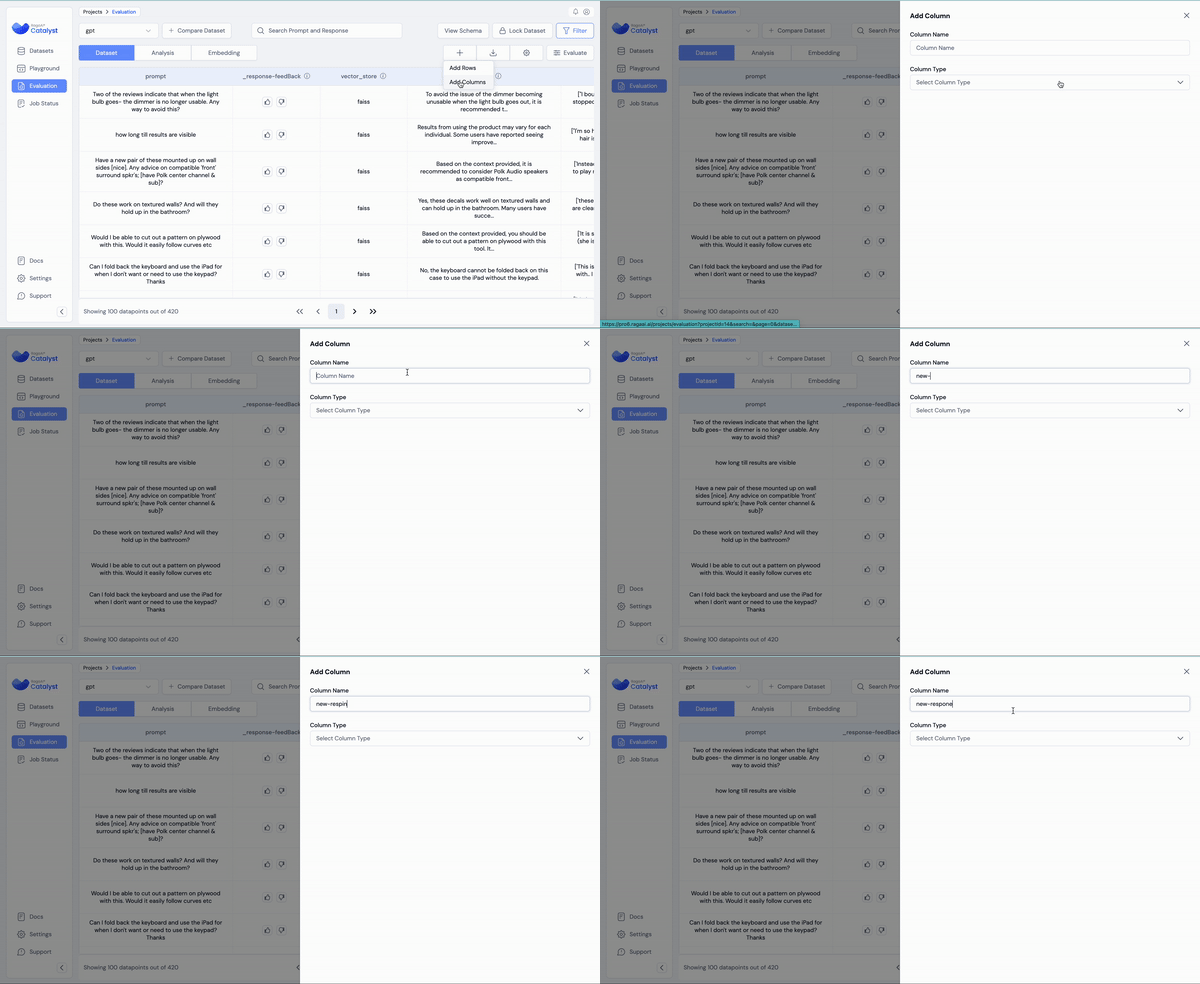
### Adding Columns
#### 1. How to Add Columns
* Click the **"+" icon** and choose the **"Add Columns"** option.
#### 2. Creating a New Response Column
* Enter a **unique response column name** to define the new column.
#### 3. Selecting Column Type
* Set the **column type** to **"Run Prompt"**. This allows the column to be used for generating new responses based on prompts.
#### 4. Importing a Prompt Slug
* Click **"Import Slug"** to pull in an existing prompt from the playground.
* You’ll need to select the **prompt name** and **version**.
#### 5. Mapping Variables
* Map the **variables** in the prompt slug to the relevant **columns** in your dataset. This mapping allows the prompt to generate new responses based on the existing data.
#### 6. Optional: Applying Filters
* You can apply **filters** to specify which data points you want to generate responses for.
* This is useful if you want to run the prompt on a subset of the dataset instead of the entire dataset.
New Column
# Running RagaAI Evals
This section contains all information required by users to run RagaAI's automated evaluation metrics as well as guardrails.
### Prerequisite:
Ensure you have set all LLM APIs you want to use. You can enter Azure, Gemini, Groq, and OpenAI API for running evals.
Navigate to Settings/API Keys, then enter and save the API keys for the LLM provider you want to use. You will be required to enter the provider in parameter while executing tests.
# Executing Evaluations
Run various cutting edge evaluation metrics out-of-the-box with a few simple steps
### Via UI:
Evaluation
#### 1. Adding an Evaluation
* Navigate to your dataset and click the **"Evaluate"** button to begin configuring your evaluation.
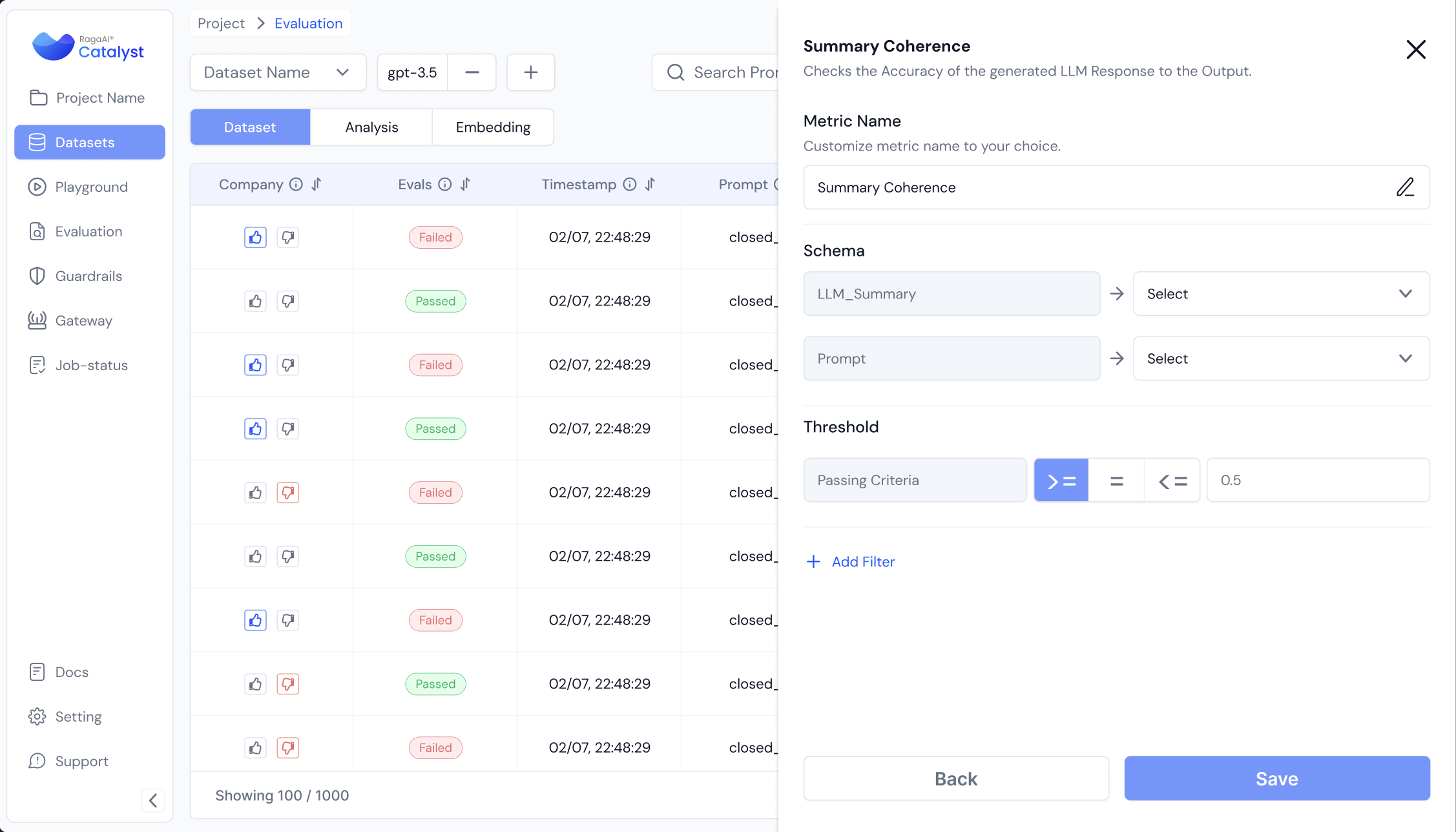
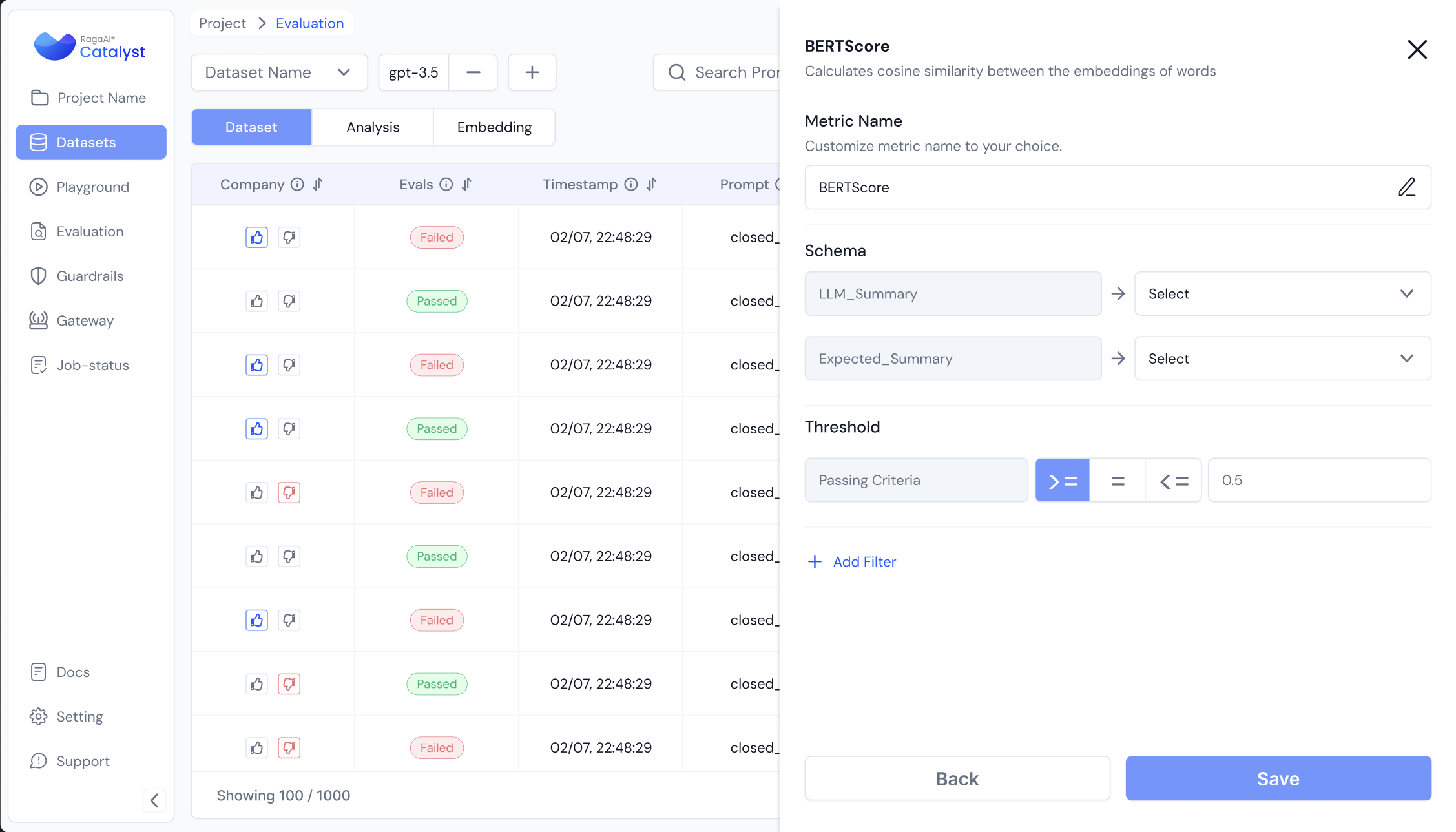
**2. Selecting a Metric**
* Choose the **metric** you want to run on the dataset from the available options.
#### 3. Naming the Metric
* Enter a **unique metric name** to identify this evaluation. This will help you track the column name .
#### 4. Configure the parameters
* Choose the **model** you want to use for running the evaluation. You can select from pre-configured models within the platform or use a custom gateway (described [here](https://docs.raga.ai/ragaai-catalyst-1/concepts/enable-custom-gateway)) to perform the evaluations.
* In case you have configured your own gateway, you should see a "custom\_gateway" option in the model selection dropdown, which can be selected and used.
* Map the selected metric to the appropriate **column names** in your dataset.
* Ensure that each metric is correctly aligned with the corresponding data columns to ensure accurate evaluation.
#### 5. Threshold
* User can configure the passing criteria for each metric to define the passed and failed datapoints. Users can re-configure the threshold once they have been calculated from the UI using the ⚙️ icon beside the metric column name.
* Click on **"Update Threshold"** to update.
#### 6. Applying Filters (Optional)
* Optionally, you can apply **filters** to narrow down the data points for the evaluation.
* This is useful if you want to evaluate a specific subset of your dataset.
#### 7. Saving the Configuration
* Once the metric, model, and filters are configured, click **"Save"** to save your evaluation setup.
#### 8. Configuring Multiple Evaluations
* Repeat the steps above to **configure multiple evaluations** if needed. This allows you to run several evaluations on the dataset simultaneously.
#### 9. Running the Evaluations
* Once all evaluations are set up, click **"Evaluate"** to execute the evaluations for all the configured metrics.
### Via SDK:
You can also run metrics using the following commands:
```python
from ragaai_catalyst import Evaluation
evaluation = Evaluation(project_name="your-project-name",
dataset_name="your-dataset-name")
evaluation.list_metrics() #List available metrics
#Define schema mapping for all metrics to be run
schema_mapping={
'Query': 'prompt',
'Response': 'response',
'Context': 'context',
'ExpectedResponse': 'expected_response'
}
#List metrics to be run
metrics = [
{"name": "Hallucination", "config": {"model": "gemini-1.5", "provider": "gemini"}, "column_name": "Hallucination_v1", "schema_mapping": schema_mapping},
{"name": "Response Correctness", "config": {"model": "gpt-4o-mini", "provider": "openai"}, "column_name": "Response_Correctness_v1", "schema_mapping": schema_mapping},
{"name": "Toxicity", "config": {"model": "gpt-4o-mini", "provider": "openai"}, "column_name": "Toxicity_v1", "schema_mapping": schema_mapping}
]
#Trigger listed metrics to run
evaluation.add_metrics(metrics=metrics)
```
The schema mapping above follows a format similar to "key":"value" representations, with "key" representing the column names in your dataset, and "value" representing a Catalyst Schema definition variable (pre-defined). Here is a list of all supported schema variables (case-sensitive):
* prompt
* context
* response
* expected\_response
* expected\_context
* traceId
* timestamp
* metadata
* pipeline
* cost
* feedBack
* latency
* system\_prompt
* traceUri
In case you have enabled a custom gateway, the above metric evaluation configuration will be edited for your model's details as follows:
```python
{"name": "Hallucination", "config": {"model": "your-model-name", "provider": "your-model-provider"}, "column_name": "Hallucination_v1", "schema_mapping": schema_mapping}
```
Once evaluations have been triggered, they can be tracked and accessed as follows:
```python
#Get status
evaluation.get_status()
#View Results
df = evaluation.get_results()
df.head()
```
# Compare Datasets
Compare results from multiple datasets or runs side by side. Use diff view to spot performance differences across models and dataset versions easily.
The Compare Datasets feature allows you to juxtapose results from different datasets and compare the results side by side. This helps you identify patterns, strengths, and weaknesses across multiple datasets.
To merge two datasets, follow these steps:
1. Inside the Evaluations tab, click on the "Select to compare" button to select multiple datasets for comparison.
Compare Dataset
2. Click the multiple datasets which you want to merge.
select multiple datasets to merge
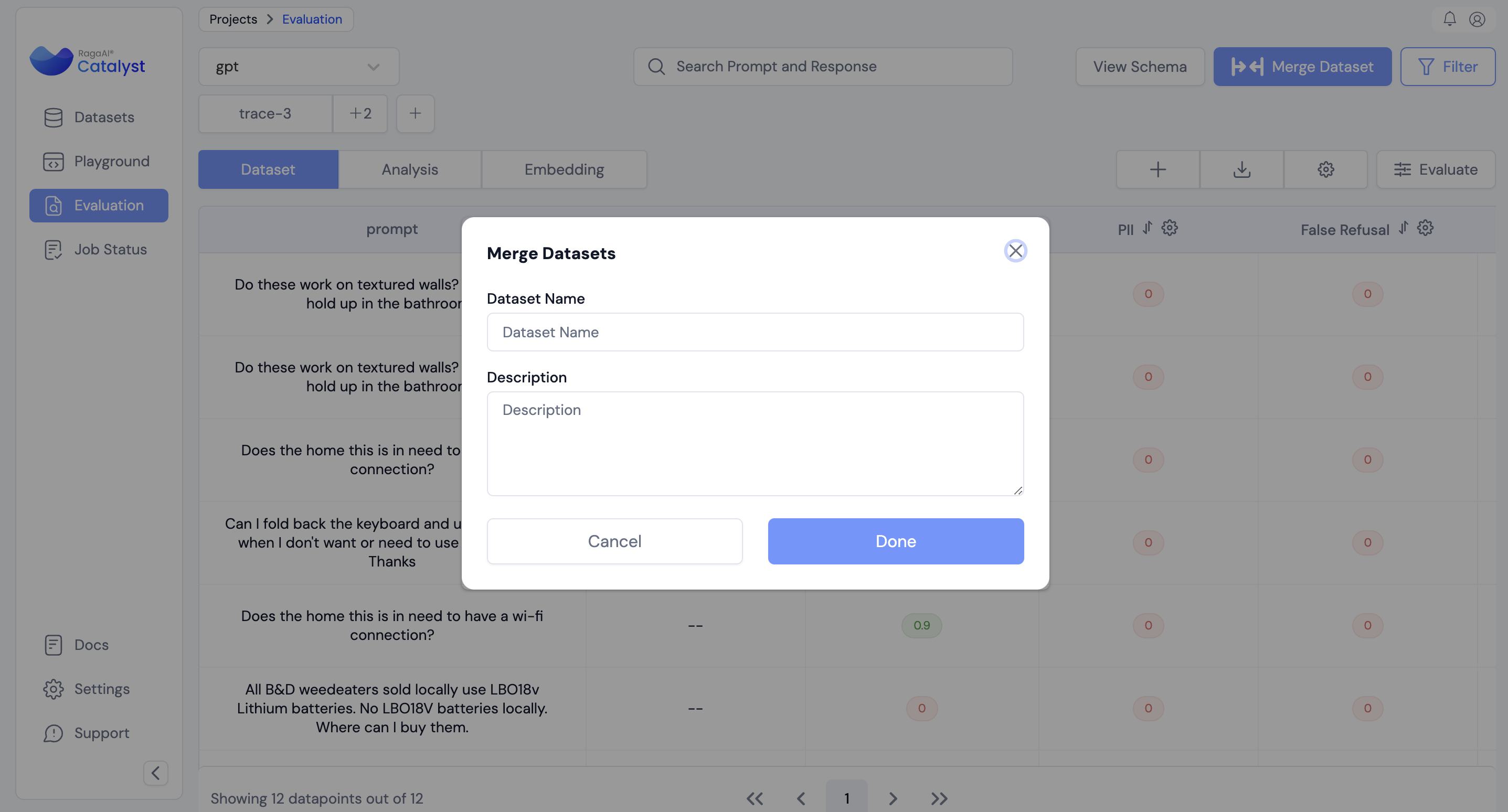
3. Click on **"Merge dataset"**
3. Mention the merged dataset name and optionally add description.
3. You can find the merged dataset in the dataset tab.
# Analysis
RagaAI Catalyst’s analysis dashboard helps interpret evaluation results with metrics, charts, and visualizations. Drill into test cases, spot failure patterns and gain insights to improve your LLM.
The **Analysis** section of the RagaAI Catalyst provides powerful data tables and visualizations that help you evaluate the performance of your dataset. Here, you can explore insights, metrics, and graphs to better understand the results of your testing and experimentation.
The **Analysis** tab is located within the following path:\
**\[Project > Dataset > Evaluation > Analysis]**
This section allows you to:
* View insights related to various metrics and response columns.
* Toggle between different metrics for analysis.
* Add, customize, or remove graphs for deeper insight.
***
### Insights Overview
Once you're in the **Analysis** tab, you’ll find a set of visual graphs and tables that summarize the results from your evaluation. Here's a step-by-step guide to navigating the insights:
#### 1. Accessing the Insights
* In the **Evaluation** tab of your chosen dataset, click on **Analysis**.
* You will be presented with multiple graphs and insights that showcase data trends and key performance indicators.
#### 2. Customizing Metrics
* By default, the dashboard shows all metrics applied to the dataset.
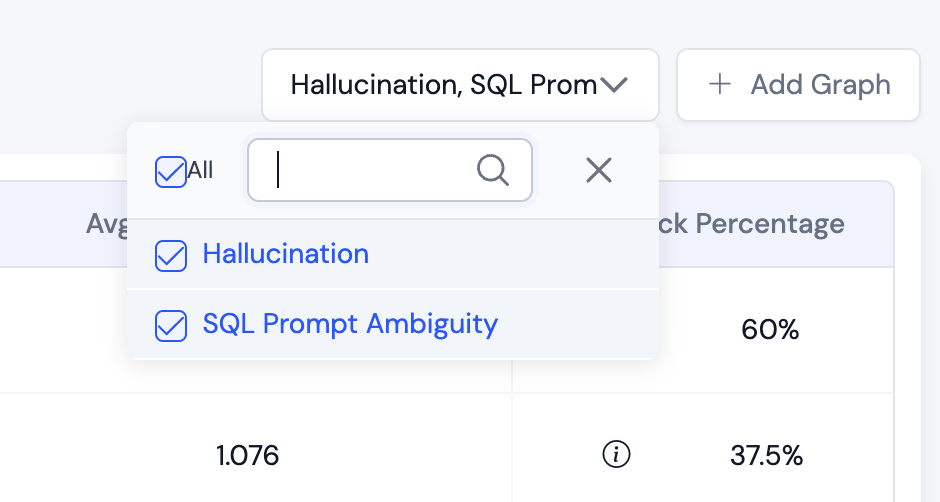
* You can toggle specific metrics using the dropdown menu at the top.
* **Tip:** If you don’t want to view a certain metric’s analysis, simply uncheck it from the dropdown.
metric selection
#### 3. Summary Tables
* **Table 1**: Provides an overall summary of the dataset's response columns and metadata associated with it.
* **Positive Feedback**: Calculated as the ratio of data points with positive feedback to the total feedback (positive + negative), shown as a percentage.
* Note: i icon show the statistics of no. of positive and negative feedback datapoints
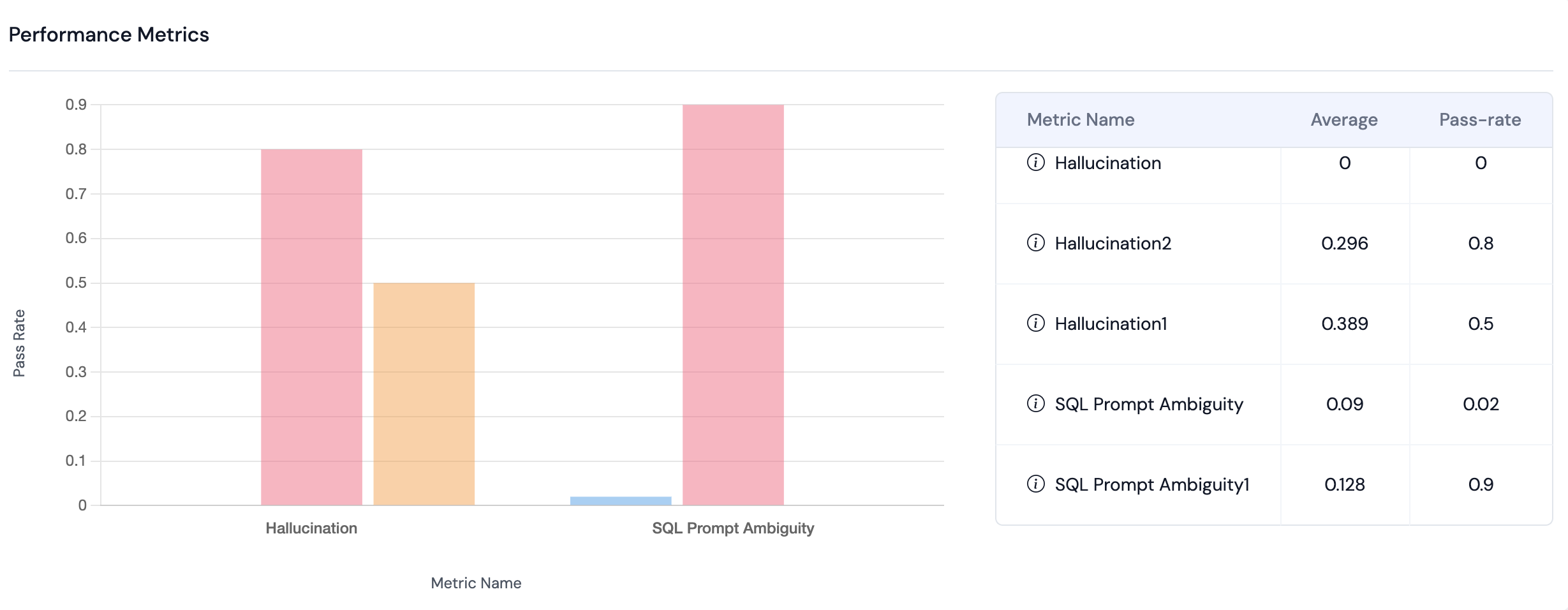
* **Table 2**: Displays a summary of all metrics that were applied to the dataset.
* Shows the **average score** and the **pass rate** (percentage of data points that passed the metric threshold).
* Note: The data in the table will automatically update based on any filters you apply.
Metric Summary
***
### Adding and Customizing Graphs
In addition to the default graphs, you can add new graphs to visualize specific metrics and metadata. Here’s how:
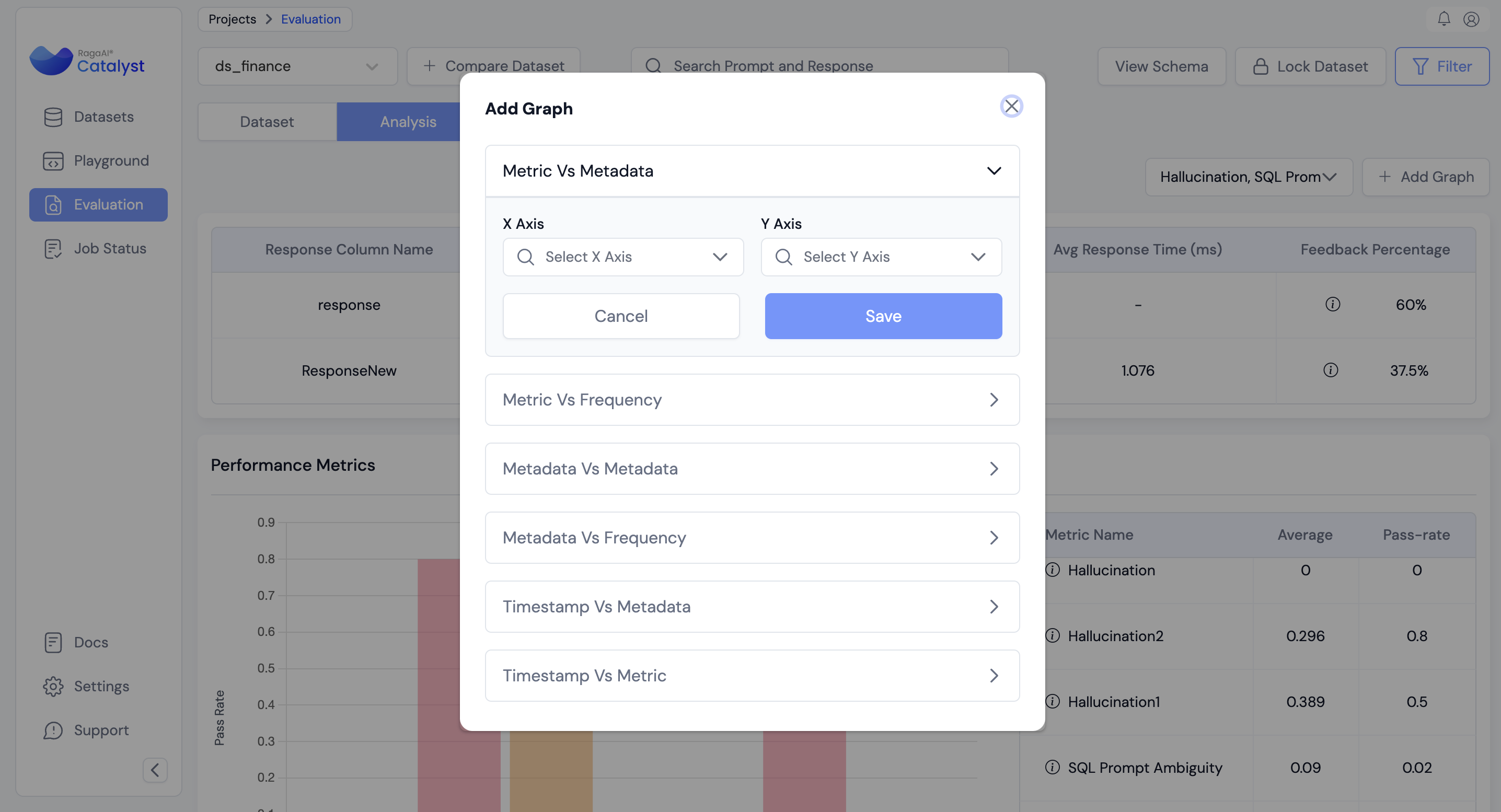
#### 1. Adding a New Graph
* Click on the **"Add Graph"** button.
* Choose the type of graph you want to create (eg: metadata vs metric).
* Select your **X-axis** and **Y-axis** data points based on the metrics and metadata you wish to analyze.
* Click **"Save"**, and your new graph will be generated.
#### 2. Deleting or Editing Graphs
* If you want to remove a graph, click on the **kebab menu** on the top right of the graph.
* Select **"Delete"** to remove it.
* You can always add a graph back later by following the steps in the **Adding a New Graph** section.
***
By following these steps, you can easily access valuable insights and customize your visualizations to suit your analysis needs. The flexibility of the Analysis dashboard allows you to focus on the metrics that matter most, helping you derive actionable conclusions from your dataset.
# Embeddings
Explore how RagaAI Catalyst uses vector embeddings for semantic analysis. Visualize spaces, compare query–document similarity, and apply metrics to evaluate LLM retrieval quality.
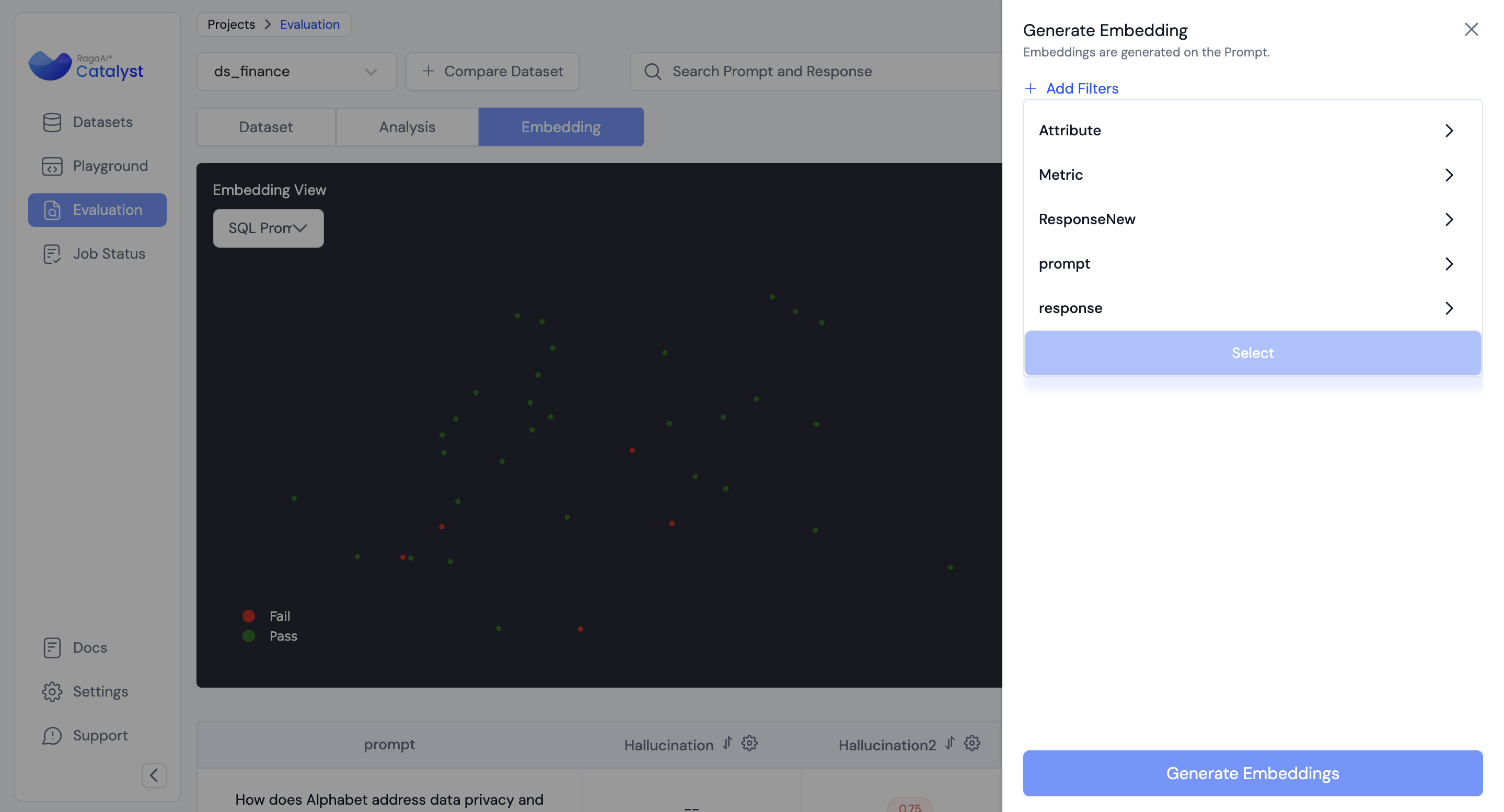
The **Generate Embeddings** feature allows users to create embeddings for their dataset based on prompts. .
The **Analysis** tab is located within the following path:\
**\[Project > Dataset > Evaluation > Embeddings]**
### How to Generate Embeddings
#### 1. Initiating the Embedding Generation
* To start generating embeddings, click on the **"Generate Embeddings"** button.
* **Note**: Embeddings are generated on the basis of Prompt Column.
#### 2. Applying Filters (Optional)
* If you only want to generate embeddings for specific data points, you can apply filters. These filters help you narrow down the data points to focus on specific criteria before generating embeddings.
* For example, you may choose to apply filters based on metadata or response columns.
#### 3. Generating Embeddings
* Once you’ve set your filters (if any), click **"Generate Embeddings"** to create a job.
generate embeddings
#### 4. Viewing the Embeddings
* When the job is complete, you’ll be able to visualise the embeddings directly in the interface.
* **Note**: If the number of generated embeddings exceeds the visualization limit, the platform will automatically sample points to fit within the limit.
#### 5. Color Coding for Insights
* The generated embeddings can be color-coded based on a specific metric, user can toggle using the dropdown.
* The color coding will differentiate between **pass** and **fail** data points, providing a clear visual cue for performance trends within the dataset.
datapoints color coded on the basis of metric
***
### Important Notes
* If you don’t apply any filters, embeddings will be generated for all available data points.
* The platform automatically handles large datasets by sampling data points for visualization purposes if needed.
# RagaAI Metric Library
This section highlights all the different kinds of evaluation metrics and guardrails available on the RagaAI platform.
Metrics are essential tools for quantifying and qualifying insights derived from runs. They are aggregated to provide a comprehensive view across multiple runs or an entire project. At RagaAI, our metrics are designed to automate and standardise the evaluation of generative AI applications, ensuring that teams can consistently organise around a unified evaluation framework.
**Key Benefits of RagaAI Metrics:**
1. **Automation and Standardisation**: RagaAI metrics streamline the evaluation process, reducing manual effort and ensuring consistency across evaluations.
2. **Comprehensive Insights**: By aggregating metrics across runs and projects, RagaAI provides a holistic view of performance and areas for improvement.
3. **Customisability**: Our metrics framework is flexible, allowing teams to incorporate any relevant metrics tailored to their specific projects or runs.
# RAG Metrics
Overview of RAG metrics in the RagaAI Metric Library. Measure hallucination, faithfulness, and context use to assess LLM accuracy and reliability with external knowledge.
**RAG (Retrieval-Augmented Generation) Metrics** help you measure how well your retrieval pipelines and generation layers are performing inside **RagaAI Catalyst**. Since RAG systems combine search + LLM reasoning, monitoring both sides is critical to ensure reliability, accuracy, and efficiency.
### Why RAG Metrics matter
* **Detect gaps in retrieval**: Spot when your retriever fails to surface the most relevant passages.
* **Evaluate generated answers**: Check if the model’s outputs are grounded in retrieved context.
* **Compare retrievers and models**: Benchmark different embeddings, vector stores, or LLMs with the same dataset.
* **Optimize cost vs quality**: Find the balance between wider retrieval vs faster responses.
# Hallucination RAG Metric
Check if an LLM adds unsupported or fabricated details. A high hallucination score flags ungrounded content and helps developers spot false outputs.
**Objective**: This metric evaluates the overlap of facts between the Response and the Context. It penalises any fabricated, incorrect or contradictory facts mentioned in the Response that are not found in the Context.
**Required Parameters**: `Prompt`, `Response`, `Context`
**Interpretation**: A higher score indicates the model response was hallucinated.
**Code Execution:**
```python
metrics=[
{"name": "Hallucination", "config": {"model": "gpt-4o-mini", "provider": "openai"}, "column_name": "your-column-identifier", "schema_mapping": schema_mapping}
]
```
The "schema\_mapping" variable needs to be defined first and is a pre-requisite for evaluation runs. Learn how to set this variable [here](/ragaai-catalyst/on-premise-deployment/on-premise-deployment-for-gcp).
**Example**:
* Prompt: What is the capital of Brazil?
* Context: Brazil is the largest country in South America, known for its diverse culture and the Amazon rainforest. Its official language is Portuguese and its capital is Brasília.
* Response: The capital of Brazil is Rio de Janeiro, which is famous for its Copacabana beach, Christ the Redeemer statue, and vibrant carnival celebrations.
* *Metric Output*: {‘score’: 1, ‘reason’: ‘The capital of Brazil is Brasília, not Rio de Janeiro’}
# Faithfulness RAG Metric
Measure how well an LLM’s answer stays true to the source material. Ensure factual accuracy in RAG by avoiding distortions or errors.
**Objective:** This metric determines the *proportion* of facts in the response that originate from the context information. The generated answer is considered faithful if all the claims made can be inferred from the provided context.
**Required Parameters**: `Prompt`, `Response`, `Context`
**Interpretation:**
* Lower faithfulness score indicates the model is not able to focus on the correct context document.
* Lower faithfulness score indicates the model is hallucinating and generating information not present in the context documents.
* Lower faithfulness score indicates the Knowledge Base has contradicting information regarding the topic referred to in the prompt.
**Code Execution:**
```python
metrics=[
{"name": "Faithfulness", "config": {"model": "gpt-4o-mini", "provider": "openai"}, "column_name": "your-column-identifier", "schema_mapping": schema_mapping}
]
```
The "schema\_mapping" variable needs to be defined first and is a pre-requisite for evaluation runs. Learn how to set this variable [here](/ragaai-catalyst/concepts/running-ragaai-evals/executing-evaluations).
**Example**:
* Prompt: Who discovered penicillin?
* Context: Penicillin is one of the most important discoveries in medical science, marking the beginning of the antibiotic era. It was discovered in 1928 by Alexander Fleming, a Scottish bacteriologist.
* Response: Alexander Dumas discovered penicillin.
* *Metric Output*: {‘score’: 0, ‘reason’: ‘As per context penicillin was discovered by Alexander Fleming’}
# Response Correctness RAG Metric
Assess if the LLM’s response directly answers the user’s question using context. Evaluate accuracy to check if the model found the right information.
**Objective**: This metric measures how accurate and factually grounded the entire response is, as compared to the expected response (ground truth).
**Parameters:** `Prompt`, `Response` ,`Expected Response`
**Interpretation**: Higher score indicates the model response was correct for the prompt. Failed result indicates the response is not factually correct compared to the expected response.
**Code Execution:**
```python
metrics=[
{"name": "Response Correctness", "config": {"model": "gpt-4o-mini", "provider": "openai"}, "column_name": "your-column-identifier", "schema_mapping": schema_mapping}
]
```
The "schema\_mapping" variable needs to be defined first and is a pre-requisite for evaluation runs. Learn how to set this variable [here](/ragaai-catalyst/concepts/running-ragaai-evals/executing-evaluations).
**Example**:
* Prompt: Who was the first person to walk on the moon and when did it happen?
* Expected Response (Ground Truth): The first person to walk on the moon was Neil Armstrong, and it happened on July 20, 1969.
* Response: The first person to walk on the moon was Buzz Aldrin, and it happened on July 20, 1970.
* *Metric Output*: {‘score’: 0, ‘reason’: ‘Neil Armstrong is the first person to walk on moon on July 20, 1969.’}
# Response Completeness RAG Metric
Check if the LLM’s answer fully addresses the question. Ensures responses cover all key points without missing details when context allows.
**Objective:** The Completeness metric measures how well a response fulfills the requirements of the given prompt. It evaluates whether the response covers all necessary aspects as expected.
**Required Parameters:** `Prompt`, `Response`, `Expected Response`
**Interpretation:**
* **1:** The response is complete, meaning it thoroughly addresses all parts of the prompt and meets the criteria set by the expected response.
* **0:** The response is incomplete, indicating that it fails to fully address the prompt or misses key elements outlined in the expected response.
**Metric Execution via UI:**
**Code Execution:**
```python
metrics=[
{"name": "Response Completeness", "config": {"model": "gpt-4o-mini", "provider": "openai"}, "column_name": "your-column-identifier", "schema_mapping": schema_mapping}
]
```
The "schema\_mapping" variable needs to be defined first and is a pre-requisite for evaluation runs. Learn how to set this variable [here](/ragaai-catalyst/concepts/running-ragaai-evals/executing-evaluations).
**Example**:
* Prompt: Describe the water cycle.
* Expected Response (Ground Truth): The water cycle consists of several stages: evaporation, condensation, precipitation, and collection. Water from oceans, lakes, and rivers evaporates due to the sun's heat, turning into water vapour. This vapour rises and cools, condensing into clouds. When the clouds become heavy, precipitation occurs in the form of rain, snow, sleet, or hail. The water then collects in bodies of water, and the cycle repeats.
* Response: The water cycle includes evaporation and precipitation. Water from oceans evaporates and later falls back to the earth as rain.
* *Metric Output*: {‘score’: 0.2, ‘reason’: The response is incorrect because it does not cover all the key stages and details of the water cycle as expected.’}
# False Refusal RAG Metric
Identify the instances where LLM improperly refuses to answer a question despite having sufficient information to do so. Understand how to fine-tune overly cautious or misaligned refusal behaviors.
**Objective:** This metric identifies instances where an LLM incorrectly declines to provide a response, despite the available context containing sufficient information to respond accurately.
**Required Parameters**: `Prompt`, `Response`, `Context`
**Interpretation:** 1 corresponds to a response being falsely refused.
**Metric Execution via UI:**
**Code Execution:**
```python
metrics=[
{"name": "False Refusal", "config": {"model": "gpt-4o-mini", "provider": "openai"}, "column_name": "your-column-identifier", "schema_mapping": schema_mapping}
]
```
The "schema\_mapping" variable needs to be defined first and is a pre-requisite for evaluation runs. Learn how to set this variable [here](/ragaai-catalyst/concepts/running-ragaai-evals/executing-evaluations).
**Example**:
* Prompt: Can you summarise the book 'Pride and Prejudice'?
* Context: Pride and Prejudice is a novel by Jane Austen that follows the character development of Elizabeth Bennet, the dynamic protagonist of the book. Set in the early 19th century, the novel deals with themes of love, reputation, and class distinctions.
* Response: Sorry, I cannot provide a summary of the book.
* *Metric Output*: {‘score’: 1, ‘reason’: ‘information provided should enable the LLM to generate a summary’}
# Context Relevancy RAG Metric
Evaluate how relevant the retrieved context is to the user’s query and the LLM’s answer, ensuring the model uses appropriate and useful information.
The Context Relevancy metric evaluates the quality of the retriever used in the RAG pipeline. This metric is vital to ensure that the the documents retrieved by the retriever is relevant for answering the prompt and the retriever mechanism in the RAG pipeline is working as expected.
**Required Parameters**: `Prompt`, `Context`
**Interpretation:**
Lower metric score indicates one of these:
* The retrieval mechanism is not working poorly.
* The Knowledge Base doesn't have sufficient data to supply documents to the prompt.
**Metric Execution via UI:**
**Code Execution**
```python
metrics=[
{"name": "Context Relevancy", "config": {"model": "gpt-4o-mini", "provider": "openai"}, "column_name": "your-column-identifier", "schema_mapping": schema_mapping}
]
```
The "schema\_mapping" variable needs to be defined first and is a pre-requisite for evaluation runs. Learn how to set this variable [here](/ragaai-catalyst/concepts/running-ragaai-evals/executing-evaluations).
# Context Precision RAG Metric
Measure how much of the provided context was relevant to the answer. High context precision means the model used only the most relevant parts with minimal extra info.
**Objective**: This metric calculates the ratio of the total number of relevant documents retrieved out of the total number of retrieved documents. The test measures the proportion of available contextual information that could prove useful in answering the prompt.
**Required Parameters**: `Prompt`, `Expected Response`, `Context`
**Interpretation**: A higher score signifies more major proportion of contexts supplied to the LLM helped answer the prompt question
**Code Execution:**
```python
metrics=[
{"name": "Context Precision", "config": {"model": "gpt-4o-mini", "provider": "openai"}, "column_name": "your-column-identifier", "schema_mapping": schema_mapping}
]
```
The "schema\_mapping" variable needs to be defined first and is a pre-requisite for evaluation runs. Learn how to set this variable [here](/ragaai-catalyst/concepts/running-ragaai-evals/executing-evaluations).
**Example**:
* Prompt: What is the tallest mountain in the world?
* Expected Response: The tallest mountain in the world is Mount Everest, which has a peak that reaches 8,848 metres (29,029 feet) above sea level.
* Context: \[‘Mount Everest is the tallest mountain in the world, with a peak that reaches 8,848 metres (29,029 feet) above sea level.’,’The Himalayas, where Mount Everest is located, is a mountain range in Asia, separating the plains of the Indian subcontinent from the Tibetan Plateau.’,’K2, also known as Mount Godwin-Austen, is the second-highest mountain in the world and is part of the Karakoram Range.’]
* *Metric Output*: {‘score’: 0.33, ‘reason’: ‘Only one context is directly relevant to answering the prompt. The other two contexts, while related to mountains, do not directly address the question about the tallest mountain.’}
# Context Recall RAG Metric
Assess how well the LLM used relevant context. High recall means it captured key details without missing important information.
**Objective**: This metric measures the ability to retrieve documents containing ground truth facts. Simply, it returns the proportion of context documents which had impact on the ground truth response.
**Required Parameters**: `Prompt`, `Expected Response`, `Context`
**Interpretation**: Higher score signifies major proportion of contexts supplied to the LLM were helpful in answering the prompt question
**Code Execution:**
```python
metrics=[
{"name": "Context Recall", "config": {"model": "gpt-4o-mini", "provider": "openai"}, "column_name": "your-column-identifier", "schema_mapping": schema_mapping}
]
```
The "schema\_mapping" variable needs to be defined first and is a pre-requisite for evaluation runs. Learn how to set this variable [here](/ragaai-catalyst/concepts/running-ragaai-evals/executing-evaluations).
**Example**:
* Prompt: What is the chemical formula for water and what are different elements in it?
* Expected Response: The chemical formula for water is H2O and it is composed of two elements: hydrogen and oxygen.
* Context: \[‘Water is essential for all known forms of life and is a major component of the Earth's hydrosphere.’,‘Water chemical formula is H2O.’, ‘The chemical formula for carbon dioxide is CO2, which is a greenhouse gas.’]
* *Metric Output*: {‘score’:0.5, ‘reason’:‘’context does not contain any information about the elements of water’}
# PII Detection RAG Metric
Check LLM outputs for Personally Identifiable Information (names, emails, phone numbers) to prevent sensitive data leaks and ensure privacy compliance.
**Objective**: This guardrail ensures that any given text does not leak any Personally Identifiable Information. Currently, PIIs supported are:- 'EMAIL\_ADDRESS' and 'URL'. If PII is detected, it will fail with a reason that anonymises the detected PII entities.
**Required Parameters**: `Response`
**Interpretation**: Higher score indicates the model response has PII exposed.
**Code Execution:**
```python
metrics=[
{"name": "PII", "config": {"model": "gpt-4o-mini", "provider": "openai"}, "column_name": "your-column-identifier", "schema_mapping": schema_mapping}
]
```
Model and Provider parameters are not mandatory to run Guardrails.
The "schema\_mapping" variable needs to be defined first and is a pre-requisite for evaluation runs. Learn how to set this variable [here](/ragaai-catalyst/concepts/running-ragaai-evals/executing-evaluations).
**Example**:
* Response: John Doe's MRI results were sent to .
* *Metric Output*: {‘score’: 1, ‘reason’: ‘John Doe’s MRI results were sent to EMAIL’}
{% hint style="warning" %}
Model and Provider parameter are not required to run Guardrails
{% endhint %}
# Toxicity RAG Metric
Evaluate LLM responses for toxic or offensive language. Flag unsafe outputs and apply filters to ensure safe, respectful interactions.
**Objective**: This guardrail uses pre-trained multi-label models to check whether the generated text is toxic. If the model predicts any label of: toxicity, severe\_toxicity, obscene, threat, insult, identity\_attack, or sexual\_explicit with confidence higher than the specified threshold, the guardrail fails.
**Required Parameters**: `Response`
**Interpretation**: Higher score indicates the model response was toxic.
**Metric Execution via UI:**
**Code Execution:**
```python
metrics=[
{"name": "Toxicity", "config": {"model": "gpt-4o-mini", "provider": "openai"}, "column_name": "your-column-identifier", "schema_mapping": schema_mapping}
]
```
Model and Provider parameters are not mandatory to run Guardrails.
The "schema\_mapping" variable needs to be defined first and is a pre-requisite for evaluation runs. Learn how to set this variable [here](/ragaai-catalyst/concepts/running-ragaai-evals/executing-evaluations).
# Chat Metrics
Chat Metrics in the RagaAI Metric Library evaluate conversational AI quality. Measuring instruction adherence, user clarity, agent helpfulness, coherence, and overall dialogue performance.
### Chat Metrics
**Chat Metrics** within the RagaAI Metric Library provide targeted insights into conversational performance—measuring how effectively your agents comply with instructions, engage users, and respond accurately in context.
Supported metrics include:
{% content-ref url="/pages/AGMzo5LcsR4zAmqRKGCC" %}
[Agent Quality Chat Metric](/ragaai-catalyst/ragaai-metric-library/chat-metrics/agent-quality)
{% endcontent-ref %}
{% content-ref url="/pages/NPHVJUZWB2TZr3oROWT8" %}
[Instruction Adherence Chat Metric](/ragaai-catalyst/ragaai-metric-library/chat-metrics/instruction-adherence)
{% endcontent-ref %}
{% content-ref url="/pages/H0Oajr7dEDdN1xkOMQww" %}
[User Chat Quality](/ragaai-catalyst/ragaai-metric-library/chat-metrics/user-chat-quality)
{% endcontent-ref %}
### Why Chat Metrics Matter
* Assess **response relevance and coherence** : crucial for user satisfaction in chat agents.
* Ensure **adherence to prompts and system instructions** : especially in regulated or brand-aligned workflows.
* Track **user-side clarity** to diagnose miscommunication risks.
* Support **iterative improvement** by emitting quantifiable scores for agent tuning and prompt refinement.
# Agent Quality Chat Metric
Evaluate the AI assistant’s performance based on helpfulness, accuracy, and appropriateness across the full conversation, giving a holistic engagement score.
The Agent Quality metric evaluates the accuracy, relevance, and contextual alignment of responses generated by the conversational agent in a chat use case. This metric assesses whether the agent’s responses fulfill the user's intent, maintain engagement, and provide appropriate and coherent replies within the conversation flow. An LLM is used as an evaluator to determine if the agent’s responses meet quality and engagement standards for an effective chat interaction.
#### Required Column in Dataset:
* **Chat**: A single column containing both user prompts and the agent’s generated responses in a sequential format, capturing the full conversation context.
#### Interpretation:
A higher Agent Quality score suggests that the agent's responses are more contextually appropriate, aligned with the user’s intent, and contribute positively to the conversation's flow. This metric reflects the agent’s ability to maintain high-quality interactions in chat settings.
#### Metric Execution via UI:
To execute this metric, select **Agent Quality** from the list of metrics in the UI and configure evaluation settings to assess responses within the conversation sequence.
#### Example:
* **Chat**:
* **User**: “Can you help me find a good Italian restaurant nearby?”
* **Agent Response**: “Sure! There’s a highly-rated Italian restaurant nearby called ‘La Dolce Vita,’ known for its authentic pasta and friendly atmosphere.”
* **Metric Score**: 0.95\
**Reasoning**: The agent’s response is accurate, aligns with the user’s intent, and provides a helpful recommendation. The response includes specific details about the restaurant, contributing positively to user engagement in the conversation.
# Instruction Adherence Chat Metric
Evaluate how well the AI follows instructions and system prompts. Ensure responses align with user requests, formats, and style guidelines.
The Instruction Adherence metric evaluates how well the agent's responses align with specific instructions provided in a chat use case. This metric assesses the degree to which the agent’s responses follow both user-specified instructions and the overarching system prompt, ensuring that replies are contextually relevant, compliant, and follow designated guidelines. An LLM is used as a judge to score adherence by comparing the response against the specified instructions and system prompt.
#### Required Columns in Dataset:
* **Chat**: A single column containing the entire conversation, including user prompts and agent responses, to provide full conversational context.
* **Instructions**: The specific instructions given for the agent to follow in its responses (e.g., tone, format, specific details to include or exclude).
* **System Prompt**: The overarching prompt or guidelines provided to the agent, defining the general context or rules for the chat interaction.
#### Interpretation:
A higher Instruction Adherence score indicates that the agent’s responses closely follow the given instructions and system prompt, ensuring compliance and relevancy in each interaction. This metric is essential for scenarios where precise adherence to instructions is critical, such as customer support or guided workflows.
#### Metric Execution via UI:
To execute this metric, select **Instruction Adherence** from the list of available metrics in the UI, and configure evaluation settings to assess response alignment with both the instructions and system prompt.
#### Example:
* **Chat**:
* **User**: “Can you tell me about Italian restaurants nearby?”
* **Agent Response**: “Certainly! I recommend ‘La Dolce Vita’ for an authentic Italian experience. Let me know if you’d like directions or a reservation.”
* **Instructions**: “Provide concise, friendly responses and only suggest restaurants with high ratings.”
* **System Prompt**: “You are a friendly assistant helping users find top-rated local dining options.”
* **Metric Score**: 0.9\
**Reasoning**: The agent’s response is friendly, concise, and relevant, meeting both the instructions and the system prompt. The response could have been improved slightly by explicitly mentioning the restaurant’s high rating, which would align fully with the given instructions.
# User Chat Quality
Evaluate if user messages are clear, well-formed, and relevant. High-quality inputs enable better AI answers, while unclear queries may need refinement.
The User Chat Quality metric evaluates the quality and clarity of user inputs in a chat use case. This metric assesses whether user messages are concise, relevant, and clearly convey intent to facilitate effective responses from the agent. An LLM is used as an evaluator to score user inputs on factors like clarity, completeness, and adherence to the conversational context.
#### Required Column in Dataset:
* **Chat**: A single column containing the full chat conversation, including both user messages and agent responses, to provide context for evaluating user input quality within the flow of interaction.
#### Interpretation:
A higher User Chat Quality score indicates that user inputs are clear, well-structured, and contribute positively to the conversation flow, aiding the agent in generating accurate responses. This metric helps identify potential user-side issues that may affect chat performance, such as ambiguous or incomplete messages.
#### Metric Execution via UI:
To execute this metric, select **User Chat Quality** from the list of available metrics in the UI, and configure settings to evaluate user inputs within the full conversation context.
#### Example:
* **Chat**:
* **User**: “I need to know more about the Italian restaurants here.”
* **Agent Response**: “Of course! Are you looking for something casual or fine dining?”
* **Metric Score**: 0.85\
**Reasoning**: The user’s input is clear and relevant, specifying the interest in Italian restaurants, which provides a clear direction for the agent. However, it could be improved by specifying further details, such as preferences for dining type, which would yield an even higher score for optimal clarity.
# Text-to-SQL
Overview of Text-to-SQL metrics in RagaAI Metric Library, covering SQL correctness, query ambiguity, and alignment with user intent.
**Text-to-SQL Metrics** are essential for assessing how well your natural language queries get translated into accurate and efficient SQL statements within **RagaAI Catalyst**. These metrics help ensure that your agents generate reliable, performant SQL and faithfully reflect user intent in data-intensive workflows.
### Text-to-SQL metrics are :
{% content-ref url="/pages/9YkvKc3J95jEamrGbbtl" %}
[SQL Response Correctness](/ragaai-catalyst/ragaai-metric-library/text-to-sql/sql-response-correctness)
{% endcontent-ref %}
{% content-ref url="/pages/nwA6WVIcIHsYDj8oySH9" %}
[SQL Prompt Ambiguity](/ragaai-catalyst/ragaai-metric-library/text-to-sql/sql-prompt-ambiguity)
{% endcontent-ref %}
{% content-ref url="/pages/JHtQS2t1cnrYhQpLsVWj" %}
[SQL Context Ambiguity](/ragaai-catalyst/ragaai-metric-library/text-to-sql/sql-context-ambiguity)
{% endcontent-ref %}
{% content-ref url="/pages/VJM6DNeA1GXj5njxH8Ki" %}
[SQL Context Sufficiency](/ragaai-catalyst/ragaai-metric-library/text-to-sql/sql-context-sufficiency)
{% endcontent-ref %}
{% content-ref url="/pages/yC7uAmrfdkNNl0r65PgA" %}
[SQL Prompt Injection](/ragaai-catalyst/ragaai-metric-library/text-to-sql/sql-prompt-injection)
{% endcontent-ref %}
# SQL Response Correctness
Check if the LLM-generated SQL query retrieves the intended data. Evaluate accuracy of the model’s NL-to-SQL conversion against expected results.
**Objective:**\
This metric assesses the correctness of the SQL response generated by the model. It compares the Response (SQL query generated by the model) with the Expected Response (correct SQL query). An LLM is used as a judge to determine if the generated SQL response is logically correct and returns the same results as the expected response.
**Required Columns in Dataset:**
* **Prompt:** Query from the user
* **Response**: The SQL query generated by the model.
* **Expected Response**: The correct SQL query that should have been generated.
**Interpretation:**\
A higher score indicates that the model-generated SQL query is more accurate and aligns closely with the expected SQL query.
Metric Execution via UI:
**Code Execution:**
```python
# SQL Response Correctness
metrics = [
{"name": "SQL Response Correctness", "config": {"model": "gpt-4o-mini", "provider":"azure", "key": "value"}, "column_name":"SQL_Response_Correctness_v2"},
{"name": "SQL Response Correctness", "config": {"model": "gpt-4o-mini", "provider":"openai", "key":"value"}, "column_name":"SQL_Response_Correctness_v2"}
]
```
**Example**:
* Response: `SELECT name, age FROM students WHERE grade = 'A';`
* Expected Response: `SELECT student_name, student_age FROM students WHERE grade = 'A' AND is_enrolled = true;`
* Metric Score: `0.2`
* Reasoning: The model-generated response uses `name` and `age` instead of the correct column names `student_name` and `student_age.` The generated SQL query does not include the `AND is_enrolled = true` condition, which filters the results to only include currently enrolled students. The model correctly identified the table (`students`) and partially matched the `WHERE` clause with the `grade = 'A'` condition, but it failed to fully replicate the expected logic.
# SQL Prompt Ambiguity
Assess ambiguity in Text-to-SQL queries. High scores show questions that are vague or multi-interpretable, helping flag those needing rephrasing or more context.
**Objective:**\
This metric evaluates the clarity of the SQL prompt given to the model. It assesses how well the prompt defines the task and how likely it is to generate a correct SQL response. An LLM is used to determine if the prompt is ambiguous or unclear, which might lead to multiple valid interpretations or incorrect SQL generation.
**Required Columns in Dataset:**
* **Prompt**: The SQL prompt or task description provided to the model.
* **Context**: Additional information or dataset details that clarify the prompt.
**Interpretation:**\
A higher score indicates that the prompt was clear and unambiguous, leading to a correct or nearly correct SQL response. A lower score suggests that the prompt was unclear or poorly defined, increasing the chances of generating incorrect SQL queries.
**Metric Execution via UI:**
**Code Execution:**
```python
# SQL Prompt Ambiguity
metrics = [
{"name": "SQL Prompt Ambiguity", "config": {"model": "gpt-4o-mini", "provider":"azure"}, "column_name":"SQL_Prompt_Ambiguity_v2"},
{"name": "SQL Prompt Ambiguity", "config": {"model": "gpt-4o-mini", "provider":"openai"}, "column_name":"SQL_Prompt_Ambiguity_v2"}
]
```
#### Example:
**Prompt:**\
*Retrieve the names and ages of students with grade A.*
**Context:**\
*The dataset contains columns for `student_name`, `student_age`, and a boolean column `is_enrolled` that indicates whether a student is currently enrolled.*
**Metric Score:**\
**Score:** 0.3/1.0
**Reasoning:**
* **Ambiguity in Prompt:** The prompt does not specify whether to filter for enrolled students or to use specific column names. This leaves the task open to interpretation, which may lead to incorrect SQL queries.
* **Model Confusion:** Due to the lack of specificity, the model generated a valid SQL query but missed essential details like the `is_enrolled = true` condition and the correct column names.
**Interpretation:**\
The low score suggests that the prompt was not detailed enough to guide the model to generate the correct SQL query, highlighting the importance of clear and unambiguous task descriptions.
# SQL Context Ambiguity
Evaluate ambiguity in Text-to-SQL tasks. Check if unclear schema elements (tables, columns, etc.) cause multiple interpretations, requiring clearer context.
**Objective:**\
This metric evaluates the clarity of the context provided alongside the SQL prompt. It assesses whether the context sufficiently defines the data structure, columns, and constraints to allow the model to generate a correct SQL query. The LLM judges if the context is ambiguous or lacks necessary details, which could lead to incorrect SQL generation.
**Required Columns in Dataset:**
* **Prompt**: The SQL prompt or task description provided to the model.
* **Context**: Additional information or dataset details that clarify the prompt and guide the SQL generation.
**Interpretation:**\
A higher score indicates that the context is clear, detailed, and unambiguous, enabling the model to generate the correct SQL query. A lower score suggests that the context was unclear, incomplete, or confusing, leading to potential errors in the generated SQL query.
**Metric Execution via UI:**
\

**Code Execution:**
```python
# SQL Context Ambiguity
metrics = [
{"name": "SQL Context Ambiguity", "config": {"model": "gpt-4o-mini"}, "column_name":"SQL_Context_Ambiguity_v2"},
{"name": "SQL Context Ambiguity", "config": {"model": "gpt-4o-mini"}, "column_name":"SQL_Context_Ambiguity_v2"}
]
```
#### Example:
**Prompt:**\
*Retrieve the names and ages of students with grade A.*
**Context:**\
*The dataset contains information about students.*
**Metric Score:**\
**Score:** 0.2/1.0
**Reasoning:**
* **Ambiguity in Context:** The context is vague and does not specify key details like the column names (`student_name`, `student_age`), the existence of an enrollment status column (`is_enrolled`), or any other relevant constraints. This leaves the model without sufficient guidance to generate a precise SQL query.
* **Incomplete Information:** The lack of detailed context increases the likelihood of the model making incorrect assumptions about the data structure.
**Interpretation:**\
The low score indicates that the context provided was too ambiguous and lacked necessary details, resulting in a higher probability of generating an incorrect SQL query. Clear and detailed context is crucial for accurate SQL generation.
# SQL Context Sufficiency
Check whether the SQL context provided is enough for accurate answers. Learn to optimize context and schema inputs.
**Objective:**\
This metric evaluates whether the context provided alongside the SQL prompt is sufficient to enable the model to generate a correct SQL query. It examines if the context contains all necessary details, such as column names, data types, and constraints, to ensure that the SQL query aligns with the expected output. An LLM is used to determine if the context provided is adequate or if additional information is required.
**Required Columns in Dataset:**
* **Prompt**: The SQL prompt or task description provided to the model.
* **Context**: Additional information or dataset details that clarify the prompt and guide the SQL generation.
**Interpretation:**\
A higher score indicates that the context is sufficient and provides all the necessary information for the model to generate the correct SQL query. A lower score suggests that the context is insufficient or lacks critical details, which may lead to errors in the generated SQL query.
\
Metric Execution via UI:
**Code Execution:**
```python
# SQL Context Sufficiency
metrics = [
{"name": "SQL Context Sufficiency", "config": {"model": "gpt-4o-mini", "provider":"azure"}, "column_name":"SQL_Context_Sufficiency_v2"},
{"name": "SQL Context Sufficiency", "config": {"model": "gpt-4o-mini", "provider":"openai"}, "column_name":"SQL_Context_Sufficiency_v2"}
]
```
#### Example:
**Prompt:**\
*Retrieve the names and ages of students with grade A.*
**Context:**\
*The dataset contains information about students, including their grades.*
**Metric Score:**\
**Score:** 0.3/1.0
**Reasoning:**
* **Insufficient Context:** While the context mentions that the dataset contains information about students and their grades, it fails to specify important details such as the exact column names (`student_name`, `student_age`), the existence of an `is_enrolled` column, and whether there are any constraints on the data.
* **Missing Critical Details:** The lack of specific information about the dataset structure makes it difficult for the model to generate an accurate SQL query, as it may make incorrect assumptions or miss relevant conditions.
**Interpretation:**\
The low score reflects that the context was insufficient to guide the model effectively. For accurate SQL query generation, the context should include all necessary details, such as column names, data types, and relevant constraints, to ensure the model has enough information to work with.
# SQL Prompt Injection
Protect against prompt injection in SQL tasks. Detect malicious instructions and enforce guardrails for safer execution.
**Objective:**\
This metric evaluates the susceptibility of the SQL prompt to injection attacks or unintended command execution. It checks whether the SQL prompt could be manipulated or misinterpreted by the model to generate harmful or unintended SQL queries. An LLM is used to determine if the prompt contains vulnerabilities that could lead to SQL injection or other security issues.
**Required Column in Dataset:**
* **Prompt**: The SQL prompt or task description provided to the model.
**Interpretation:**\
A higher score indicates that the SQL prompt is secure and resistant to injection attacks, minimizing the risk of generating harmful SQL queries. A lower score suggests that the prompt is vulnerable to injection, potentially leading to dangerous or unintended SQL operations.

**Code Execution:**
```python
# SQL Prompt Injection
metrics = [
{"name": "SQL Prompt Injection", "config": {"model": "gpt-4o-mini", "provider":"azure"}, "column_name":"SQL_Prompt_Injection_v2"},
{"name": "SQL Prompt Injection", "config": {"model": "gpt-4o-mini", "provider":"openai"}, "column_name":"SQL_Prompt_Injection_v2"}
]
```
#### Example:
**Prompt:**\
*Retrieve all user data where the username is 'admin' OR '1'='1'; DROP TABLE users;--*
**Metric Score:**\
**Score:** 0.1/1.0
**Reasoning:**
* **Vulnerability to Injection:** The prompt contains an SQL injection vulnerability (`'1'='1'`) and a dangerous SQL command (`DROP TABLE users;`), which could result in unintended data exposure or data loss if executed.
* **Security Risk:** The model may interpret and execute the entire string as a valid SQL query, leading to severe consequences such as dropping important tables or exposing sensitive data.
**Interpretation:**\
The low score indicates that the prompt is highly vulnerable to SQL injection attacks. For secure SQL query generation, prompts should be carefully constructed to avoid injection risks and ensure that only the intended SQL operations are executed.
# Text Summarization
Evaluate LLM-generated summaries for accuracy and readability. Learn to refine summarization for clarity and completeness.
{% hint style="info" %}
Exclusive to enterprise customers. [Contact us](https://calendly.com/nirmalya-raga/30min?month=2025-09) to activate this feature.
{% endhint %}
RagaAI provides several metrics for evaluating text summarization tasks, divided broadly into metrics based on N-gram overlap suited for extractive tasks (e.g, ROUGE, METEOR, BLEU) vs those using embeddings and LLM-as-a-judge suited for abstractive tasks (e.g, G-Eval, BERTScore, etc.). Here is a list of available metrics:
{% content-ref url="/pages/RpWMM3V6psL182RSwl84" %}
[Broken mention](broken://pages/RpWMM3V6psL182RSwl84)
{% endcontent-ref %}
{% content-ref url="/pages/yFh067y7q0WL0etqbDFV" %}
[Broken mention](broken://pages/yFh067y7q0WL0etqbDFV)
{% endcontent-ref %}
{% content-ref url="/pages/HO6h3UBaSULC8kUnBm6k" %}
[Broken mention](broken://pages/HO6h3UBaSULC8kUnBm6k)
{% endcontent-ref %}
{% content-ref url="/pages/Ozx4ppSdJm7uQmYJOqHI" %}
[Broken mention](broken://pages/Ozx4ppSdJm7uQmYJOqHI)
{% endcontent-ref %}
{% content-ref url="/pages/CzohjlIk628nXIwuGWWz" %}
[Broken mention](broken://pages/CzohjlIk628nXIwuGWWz)
{% endcontent-ref %}
{% content-ref url="/pages/Dj4u2n0Z9iAamyYHZJA0" %}
[Broken mention](broken://pages/Dj4u2n0Z9iAamyYHZJA0)
{% endcontent-ref %}
Additionally, Catalyst offers certain Summarization metrics that do not require LLM-as-a-judge for computation, including:
{% content-ref url="/pages/w4uFBzojEwbjqUFhxbKg" %}
[Broken mention](broken://pages/w4uFBzojEwbjqUFhxbKg)
{% endcontent-ref %}
{% content-ref url="/pages/6hVvv0LXqKwj2WhnEvKa" %}
[Broken mention](broken://pages/6hVvv0LXqKwj2WhnEvKa)
{% endcontent-ref %}
{% content-ref url="/pages/zNS8MPqLsOoF0kJyovbx" %}
[Broken mention](broken://pages/zNS8MPqLsOoF0kJyovbx)
{% endcontent-ref %}
{% content-ref url="/pages/xD46tTWcbe6rn5OlBy59" %}
[Broken mention](broken://pages/xD46tTWcbe6rn5OlBy59)
{% endcontent-ref %}
# Summary Consistency
Measure whether summaries stay faithful to the original text. Spot inconsistencies and improve alignment with source content.
**Objective:**
Summary Consistency evaluates the factual alignment between the generated summary and the source content. It checks if the summary maintains the same facts, figures, and core messages as the input without introducing any hallucinations or errors. This metric is crucial for ensuring that no factual distortions occur when compressing the information.
**Required Columns in Dataset:**
`LLM Summary`, `Original Document`
**Interpretation:**
* **High values**: Indicate that the summary is factually accurate and reflects the original information without alterations.
* **Low values**: Suggest factual inconsistencies, errors, or hallucinations introduced in the summary.
**Execution via UI:**
**Execution via SDK:**
```python
metrics=[
{"name": "Summary Consistency", "config": {"model": "gpt-4o-mini", "provider": "openai"}, "column_name": "your-text", "schema_mapping": schema_mapping}
]
```
# Summary Relevance
Assess if generated summaries include key points. Identify missing elements and ensure better focus on essentials.
**Objective:**
Summary Relevance measures how much of the essential content from the original text is captured in the summary. This metric focuses on the inclusion of important topics, key points, or main ideas from the source, assessing whether the summary effectively represents the most critical parts of the content.
**Required Columns in Dataset:**
`LLM Summary`, `Expected Summary`, `Original Document`
**Interpretation:**
* **High values**: Indicate that the summary captures all the main points and relevant information from the source.
* **Low values**: Suggest that the summary omits important information or includes irrelevant details.
**Execution via UI:**
**Execution via SDK:**
```python
metrics=[
{"name": "Summary Relevance", "config": {"model": "gpt-4o-mini", "provider": "openai"}, "column_name": "your-text", "schema_mapping": schema_mapping}
]
```
# Summary Fluency
Analyze the readability and flow of summaries. Improve grammar and style for more natural outputs.
**Objective:**
Summary Fluency evaluates the linguistic quality of the summary, focusing on its grammatical correctness, smoothness of phrasing, and readability. It measures whether the summary is coherent in language, free of awkward wording or disjointed structure, and whether it can be easily understood by a reader.
**Required Columns in Dataset:**
`LLM Summary`
**Interpretation:**
* **High values**: Indicate that the summary is well-written, grammatically correct, and easily readable.
* **Low values**: Suggest poor grammar, awkward phrasing, or readability issues, making the summary difficult to understand.
**Execution via UI:**
**Execution via SDK:**
```python
metrics=[
{"name": "Summary Fluency", "config": {"model": "gpt-4o-mini", "provider": "openai"}, "column_name": "your-text", "schema_mapping": schema_mapping}
]
```
# Summary Coherence
Check if summaries are logically connected and structured. Spot gaps in flow and enhance overall quality.
**Objective:**
Summary Coherence measures the logical flow and structural integrity of the summary. It examines whether ideas are presented in a logically connected manner, ensuring that the summary follows a clear progression of thoughts. This is especially important in multi-sentence summaries, where disjointed or fragmented ideas can disrupt understanding.
**Required Columns in Dataset:**
`LLM Summary`, `Prompt`
**Interpretation:**
* **High values**: Indicate that the summary presents information in a well-organized, logically connected sequence.
* **Low values**: Suggest that the summary is disorganized or has disconnected thoughts, making it harder to follow.
**Execution via UI:**
**Execution via SDK:**
```python
metrics=[
{"name": "Summary Coherence", "config": {"model": "gpt-4o-mini", "provider": "openai"}, "column_name": "your-text", "schema_mapping": schema_mapping}
]
```
# SummaC
Use SummaC to validate summary alignment with source. Ensure factual and semantic consistency in AI-generated outputs.
**Objective:**
SummaC evaluates summarization models by assessing factual consistency. It uses Natural Language Inference (NLI) techniques to determine if the generated summary logically entails, contradicts, or is neutral with respect to the source text. This approach allows for the detection of factual hallucinations or omissions in the generated summary, focusing on maintaining logical consistency with the original input. SummaC is commonly used for fact-checking in summarization tasks to ensure accurate information representation.
**Required Columns in Dataset:**
`LLM Summary`, `Original Document`
**Interpretation:**
* **High SummaC**: Indicates that the summary is factually consistent with the source, with little to no contradictions or hallucinations.
* **Low SummaC**: Reflects potential factual inconsistencies or logical contradictions between the summary and the original text.
**Execution via UI:**
**Execution via SDK:**
```python
metrics=[
{"name": "SummaC", "config": {"model": "gpt-4o-mini", "provider": "openai"}, "column_name": "your-text", "schema_mapping": schema_mapping}
]
```
# QAG Score
Apply QAG Score to measure summary reliability. Detect factual gaps and improve question-answer consistency.
**Objective:**
QAG Score evaluates the quality of a generated summary or response by formulating questions based on the generated output and then checking if answers to those questions match the original text. This method leverages question generation and answering tasks to verify factual alignment and information consistency, particularly useful in summarization and knowledge extraction tasks. It focuses on the factual relevance of the generated content and its ability to respond accurately to pertinent questions.
**Required Columns in Dataset:**
`LLM Summary`, `Original Document`
**Interpretation:**
* **High QAG Score**: Suggests that the generated output answers key questions accurately, meaning it is factually aligned with the original source.
* **Low QAG Score**: Implies that the generated content may fail to answer or misrepresent important information, reflecting factual inconsistencies.
**Execution via UI:**
**Execution via SDK:**
```python
metrics=[
{"name": "QAGScore", "config": {"model": "gpt-4o-mini", "provider": "openai"}, "column_name": "your-text", "schema_mapping": schema_mapping}
]
```
# ROUGE
Evaluate summaries with ROUGE (Recall-Oriented Understudy for Gisting Evaluation) metrics. Measure overlap with references to track relevance and coverage.
**Objective:**
ROUGE measures the overlap of n-grams, sequences, or words between a machine-generated summary and a reference summary. It includes variants like ROUGE-N (n-gram overlap), ROUGE-L (longest common subsequence), and ROUGE-W (weighted LCS). ROUGE is primarily used for evaluating summarization tasks, focusing on recall by assessing how much relevant content in the reference summary is captured in the generated output. This metric is widely used due to its simplicity and ability to handle various granularities of comparison.
**Required Columns in Dataset:**
`LLM Summary`, `Reference Document (GT)`
**Interpretation:**
* **High ROUGE**: Indicates strong overlap between the generated text and the reference text, suggesting the system captures relevant content.
* **Low ROUGE**: Suggests poor alignment with the reference text, possibly missing key information or using different phrasing.
**Execution via UI:**
ROUGE does not require an LLM for computation.
**Execution via SDK:**
```python
metrics=[
{"name": "ROUGE", "column_name": "your-text", "schema_mapping": schema_mapping}
]
```
# BLEU
Assess LLM text outputs with BLEU (Bilingual Evaluation Understudy). Compare n-gram overlap for translation and summarization accuracy.
**Objective:**
BLEU measures the overlap of n-grams between machine-generated text and one or more reference texts. It calculates precision for n-gram matches, penalizing shorter outputs through a brevity penalty. BLEU emphasizes precision over recall, focusing on how much of the generated output matches the reference text. Although initially designed for machine translation, it is also used in various text generation tasks. However, its precision-focused approach may overlook some nuanced aspects of language generation, such as fluency and semantic accuracy.
**Required Columns in Dataset:**
`LLM Summary`, `Reference Document (GT)`
**Interpretation:**
* **High BLEU**: Represents strong n-gram precision with a good match between generated and reference text, emphasizing close word-for-word similarity.
* **Low BLEU**: Suggests insufficient n-gram overlap, which could indicate poor precision or significant deviation from the reference text.
**Execution via UI:**
BLEU does not require an LLM for computation.
**Execution via SDK:**
```python
metrics=[
{"name": "BLEU", "column_name": "your-text", "schema_mapping": schema_mapping}
]
```
# METEOR
Improve evaluation with METEOR (Metric for Evaluation of Translation with Explicit Ordering) scores. Capture synonyms, stemming, and precision/recall beyond BLEU or ROUGE.
**Objective:**
METEOR was designed to address some shortcomings of BLEU, particularly for machine translation. It evaluates machine-generated text by considering synonyms, stemming, and word order, giving higher importance to meaning and linguistic structure. METEOR uses precision, recall, and an F1-score, with additional weighting based on semantic similarity and word alignment, making it more flexible for tasks that require nuanced linguistic evaluations. It is popular for translation evaluation but can be extended to other text generation tasks.
**Required Columns in Dataset:**
`LLM Summary`, `Reference Document (GT)`
**Interpretation:**
* **High METEOR**: Reflects good alignment, considering synonyms, stemming, and word order, meaning the generated output is both semantically and syntactically aligned with the reference.
* **Low METEOR**: Implies limited semantic matching, with possible differences in vocabulary, ordering, or inability to capture linguistic variations.
**Execution via UI:**
METEOR does not require an LLM for computation.
**Execution via SDK:**
```python
metrics=[
{"name": "METEOR", "column_name": "your-text", "schema_mapping": schema_mapping}
]
```
# BERTScore
Use BERTScore to check semantic similarity in outputs. Ensure summaries align with original meaning beyond surface words.
**Objective:**
BERTScore leverages pre-trained BERT embeddings to compare the similarity between reference and generated text at the token level. Instead of using n-gram matching, it calculates cosine similarity between the embeddings of words, thus capturing deeper semantic meaning and context. This approach provides more flexibility in assessing meaning rather than relying purely on exact token overlap. BERTScore is increasingly used in generative tasks where semantic accuracy is prioritized over exact string matching, such as summarization, dialogue generation, and paraphrasing.
**Required Columns in Dataset:**
`LLM Summary (Embeddings)`, `GT Reference (Embeddings)`
**Interpretation:**
* **High BERTScore**: Indicates high semantic similarity between the generated and reference texts, suggesting that the model captures deeper meaning beyond exact word matches.
* **Low BERTScore**: Reflects low semantic alignment, suggesting the generated text diverges significantly from the intended meaning of the reference text.
**Execution via UI:**
**Execution via SDK:**
```python
metrics=[
{"name": "BERTScore", "config": {"model": "gpt-4o-mini", "provider": "openai"}, "column_name": "your-text", "schema_mapping": schema_mapping}
]
```
# Information Extraction
Evaluate how well LLMs extract information from text. Detect missed entities or relations and enhance precision.
{% hint style="info" %}
Exclusive to enterprise customers. [Contact us](https://calendly.com/nirmalya-raga/30min?month=2025-09) to activate this feature.
{% endhint %}
RagaAI provides metrics for evaluating specific information extraction tasks, in order to quantify the quality and specificity of the retrieval of targeted information from the source documents. Here is a list of available metrics:
{% content-ref url="/pages/zGqdxtq0CVI7rRONOgT3" %}
[MINEA](/ragaai-catalyst/ragaai-metric-library/information-extraction/minea)
{% endcontent-ref %}
{% content-ref url="/pages/BjIxwXbD9T7eP2AN2bLp" %}
[Subjective Question Correction](/ragaai-catalyst/ragaai-metric-library/information-extraction/subjective-question-correction)
{% endcontent-ref %}
{% content-ref url="/pages/iO7GWyEPaZIbLNrDXXE2" %}
[Precision@K](/ragaai-catalyst/ragaai-metric-library/information-extraction/precision-k)
{% endcontent-ref %}
{% content-ref url="/pages/Pb9J5NdjmUWwXKLj3Gni" %}
[Chunk Relevance](/ragaai-catalyst/ragaai-metric-library/information-extraction/chunk-relevance)
{% endcontent-ref %}
{% content-ref url="/pages/lMKlbATn0aSigIMpOndU" %}
[Entity Co-occurrence](/ragaai-catalyst/ragaai-metric-library/information-extraction/entity-co-occurrence)
{% endcontent-ref %}
{% content-ref url="/pages/9x8nJZVlvonz4q4YoRVh" %}
[Fact Entropy](/ragaai-catalyst/ragaai-metric-library/information-extraction/fact-entropy)
{% endcontent-ref %}
# MINEA
Apply MINEA (Multiple Infused Needle Extraction Accuracy) to test subjective question correction. Identify biases and improve fairness in LLM responses.
**Objective:**
MINEA assesses information extraction models by measuring the accuracy of identifying rare but critical information (the "needles") from large datasets (the "haystack"). It uses a combination of rarity detection and contextual extraction to evaluate how well a model pulls specific, infrequent data points. A high MINEA score implies the model successfully extracts crucial, rare information without being overwhelmed by more common or irrelevant data.
**Required Columns in Dataset:**
`Labeled Text`, `Source Document`
**Interpretation:**
* **High MINEA**: Indicates that the model excels at identifying rare and crucial pieces of information, even when they are hidden within a large volume of irrelevant or common data.
* **Low MINEA**: Suggests the model struggles to detect infrequent yet important details, leading to potential information gaps in extraction.
**Execution via UI:**
**Execution via SDK:**
```python
metrics=[
{"name": "MINEA", "config": {"model": "gpt-4o-mini", "provider": "openai"}, "column_name": "your-text", "schema_mapping": schema_mapping}
]
```
# Subjective Question Correction
Detect the errors in subjective question handling. Improve model performance on open-ended or opinion-based tasks.
**Objective:**
The SQC Score evaluates generative models by measuring their ability to transform incorrectly or ambiguously phrased questions into valid ones. It uses both syntactic and semantic criteria to assess how well the model corrects and reframes user inputs. A high score reflects strong contextual understanding and linguistic alignment between the generated question and expected output, important for enhancing user interaction in query-driven systems.
**Required Columns in Dataset:**
`Prompt`, `Expected Response (GT)` , `LLM Response`
**Interpretation:**
* **High SQC Score**: Reflects that the model successfully corrects ambiguous or flawed questions, offering outputs that are aligned with the desired user intent.
* **Low SQC Score**: Indicates poor performance in understanding or reformulating incorrect questions, potentially leading to irrelevant or incoherent corrections.
**Execution via UI:**
**Execution via SDK:**
```python
metrics=[
{"name": "SQCScore", "config": {"model": "gpt-4o-mini", "provider": "openai"}, "column_name": "your-text", "schema_mapping": schema_mapping}
]
```
# Precision\@K
Measure how often correct answers appear in top-K results. Track ranking performance for retrieval-augmented systems.
**Objective:**
Precision\@K measures how many of the top K retrieved or generated items are relevant to a query. It is a rank-based evaluation metric commonly used in information retrieval and recommendation systems. A higher Precision\@K score means the model has higher relevance among its top K results, indicating strong early retrieval performance, particularly when precision in high-rank positions is crucial.
**Required Columns in Dataset:**
`Prompt`, `Ranked Context`, `Labeled Text`
**Interpretation:**
* **High Precision\@K**: Shows that the top K results are highly relevant to the query, indicating the model's effectiveness in prioritizing the most appropriate outputs early in the ranking.
* **Low Precision\@K**: Suggests that the top K results contain irrelevant information, reflecting poor retrieval performance in terms of precision.
**Execution via UI:**
**Execution via SDK:**
Precision\_K doesn't require LLM for computation.
```python
metrics=[
{"name": "Precision_K", "column_name": "your-text", "schema_mapping": schema_mapping}
]
```
# Chunk Relevance
Evaluate whether retrieved text chunks are relevant. Identify irrelevant retrievals and refine data pipelines.
**Objective:**
Chunk Relevance evaluates the relevance of distinct text chunks extracted from documents in response to a query. It splits the source text into meaningful units (chunks) and assesses whether the extracted segments are contextually relevant to the given prompt or query. A high score suggests that the model is efficient in isolating and extracting coherent, meaningful portions of text, ensuring relevance and cohesion.
**Required Columns in Dataset:**
`Prompt`, `Expected Chunks`, `Retrieved Chunks`
**Interpretation:**
* **High Chunk Relevance**: Indicates that the model is efficiently selecting text segments that are contextually aligned and relevant to the query.
* **Low Chunk Relevance**: Means the model often extracts irrelevant or incoherent text chunks, leading to low-quality or disjointed responses.
**Execution via UI:**
**Execution via SDK:**
```python
metrics=[
{"name": "Chunk Relevance", "config": {"model": "gpt-4o-mini", "provider": "openai"}, "column_name": "your-text", "schema_mapping": schema_mapping}
]
```
# Entity Co-occurrence
Test how accurately LLMs connect related entities. Spot gaps in recognition and strengthen relationship extraction.
**Objective:**
Entity Co-occurrence measures the frequency with which specific entities (e.g., names, places, events) appear together within a dataset. It is used to evaluate the relationship modeling of NER systems or entity extraction models. High entity co-occurrence implies that the model successfully identifies relevant pairings of entities that often appear together, important for downstream tasks like relation extraction or knowledge graph construction.
**Required Columns in Dataset:**
`Prompt`, `Retrieved Entities`, `Expected Entities`
**Interpretation:**
* **High Entity Co-occurrence**: Suggests that the model correctly identifies and links related entities, reflecting an understanding of their relationships in the dataset.
* **Low Entity Co-occurrence**: Indicates that the model fails to detect frequent co-occurring entities, potentially missing important connections.
**Execution via UI:**
**Execution via SDK:**
Entity Co-occurrence doesn't require an LLM for computation.
```python
metrics=[
{"name": "Entity Cooccurrence", "column_name": "your-text", "schema_mapping": schema_mapping}
]
```
# Fact Entropy
Measure uncertainty in LLM facts. Use entropy scoring to identify unreliable answers and boost accuracy.
**Objective:**
Fact Entropy measures the degree of uncertainty or randomness in the factual consistency of a model’s output. It quantifies how confidently a model presents facts, with higher entropy indicating more variability or less certainty in factual assertions. This metric is critical for assessing factual accuracy in generative models, particularly in tasks where consistent, reliable factual grounding is required.
**Required Columns in Dataset:**
`Generated Facts`, `Expected Facts`
**Interpretation:**
* **High Fact Entropy**: Implies greater uncertainty or inconsistency in the model's factual assertions, suggesting unreliable or volatile outputs.
* **Low Fact Entropy**: Reflects more confident and consistent fact generation, indicating stronger factual accuracy and stability in the output.
**Execution via UI:**
**Execution via SDK:**
```python
metrics=[
{"name": "Fact Entropy", "config": {"model": "gpt-4o-mini", "provider": "openai"}, "column_name": "your-text", "schema_mapping": schema_mapping}
]
```
# Code Generation
Evaluate LLMs on generating executable code. Spot syntax or logic errors and improve development workflows.
{% hint style="info" %}
Exclusive to enterprise customers. [Contact us](https://calendly.com/nirmalya-raga/30min?month=2025-09\\) to activate this feature.
{% endhint %}
The **Code Generation Metrics** suite in RagaAI Catalyst evaluates the accuracy, robustness, and functionality of code generated by LLMs. These metrics assess aspects like structural correctness, similarity to reference code, adaptability to prompt changes, and success in passing functional tests. By measuring code-specific factors such as n-gram overlap, logical consistency, and robustness across prompt variations, these metrics provide comprehensive insights into the reliability and precision of code generation models.
{% content-ref url="/pages/5QVqq2ooIT4wbbLMQT4z" %}
[Functional Correctness](/ragaai-catalyst/ragaai-metric-library/code-generation/functional-correctness)
{% endcontent-ref %}
{% content-ref url="/pages/jxdrFZFz4ZhDGzk98oUk" %}
[ChrF](/ragaai-catalyst/ragaai-metric-library/code-generation/chrf)
{% endcontent-ref %}
{% content-ref url="/pages/9XTTdIgmS5gM8VyDN9Lp" %}
[Ruby](/ragaai-catalyst/ragaai-metric-library/code-generation/ruby)
{% endcontent-ref %}
{% content-ref url="/pages/PwAH3gID7CBggD3xUQDZ" %}
[CodeBLEU](/ragaai-catalyst/ragaai-metric-library/code-generation/codebleu)
{% endcontent-ref %}
{% content-ref url="/pages/KPSsZM8TVveiqz4xymN9" %}
[Robust Pass@k](/ragaai-catalyst/ragaai-metric-library/code-generation/robust-pass-k)
{% endcontent-ref %}
{% content-ref url="/pages/9YZXAqdMpM5RtOSCHtak" %}
[Robust Drop@k](/ragaai-catalyst/ragaai-metric-library/code-generation/robust-drop-k)
{% endcontent-ref %}
{% content-ref url="/pages/l2fxWtgnzgV61ydkMXaU" %}
[Pass-Ratio@n](/ragaai-catalyst/ragaai-metric-library/code-generation/pass-ratio-n)
{% endcontent-ref %}
# Functional Correctness
Test whether generated code runs correctly. Identify functional errors and refine LLM outputs for accuracy.
**Objective:**
Functional Correctness assesses the accuracy of code generation models by running generated code against a set of predefined test cases. The metric evaluates whether the generated program meets the expected functional requirements by checking pass/fail results on individual test cases, offering a binary and percentage-based measure of correctness.
**Required Columns in Dataset:**
`Generated Program`, `Set of Test Cases`
**Interpretation:**
* **High Functional Correctness:** Indicates that the generated code passes most or all test cases, demonstrating functional accuracy.
* **Low Functional Correctness:** Suggests that the generated code fails one or more test cases, highlighting functional discrepancies.
**Execution via UI:**
**Execution via SDK:**
```python
metrics=[
{"name": "Functional Correctness", "schema_mapping": {"generated_program": "Generated Program", "test_cases": "Set of Test Cases"}}
]
```
# ChrF
Apply ChrF metrics to measure text similarity. Use it for machine translation and summarization evaluation
**Objective:**
ChrF evaluates code generation models by calculating character-level n-gram overlaps between generated code and reference solutions. It is a token-agnostic metric that assesses the similarity in structure and detail, providing a character-level view of accuracy, ideal for detecting subtle code variations or formatting issues.
**Required Columns in Dataset:**
`Generated Code`, `Reference Code`
**Interpretation:**
* **High ChrF:** Indicates high similarity to the reference code, reflecting consistency in both syntax and function.
* **Low ChrF:** Shows potential differences in code structure, which may affect readability or correctness.
**Execution via UI:**
**Execution via SDK:**
```python
metrics=[
{"name": "ChrF", "schema_mapping": {"generated_code": "Generated Code", "reference_code": "Reference Code"}}
]
```
# Ruby
Test LLM outputs with Ruby metrics. Assess token overlap for translation accuracy and language precision.
**Objective:**
Ruby uses program dependency graph (PDG) analysis to evaluate code structure similarity. It compares the logical structure and dependencies of generated code with a reference, identifying structural and semantic alignment, making it well-suited for complex programming tasks where accuracy in logic flow is crucial.
**Required Columns in Dataset:**
`Generated Code`, `Reference Code`
**Interpretation:**
* **High Ruby Score:** Suggests that the generated code aligns closely with the logical structure of the reference code.
* **Low Ruby Score:** Indicates deviations in code logic or structure, potentially affecting functionality.
**Execution via UI:**
**Execution via SDK:**
```python
metrics=[
{"name": "Ruby", "schema_mapping": {"generated_code": "Generated Code", "reference_code": "Reference Code"}}
]
```
# CodeBLEU
Evaluate LLM-generated code with CodeBLEU. Capture logic, syntax, and structure beyond surface similarity.
**Objective:**
CodeBLEU is a comprehensive metric for evaluating code generation, integrating BLEU with code-specific aspects such as syntax and dataflow. It measures both linguistic and structural similarity, making it suitable for assessing code accuracy beyond surface-level token matching.
**Required Columns in Dataset:**
`Generated Code`, `Reference Code`
**Interpretation:**
* **High CodeBLEU Score:** Indicates strong alignment with the reference solution in terms of both syntax and logic.
* **Low CodeBLEU Score:** Reflects potential deviations in code structure or logic, which may impact functionality.
**Execution via UI:**
**Execution via SDK:**
```python
metrics=[
{"name": "CodeBLEU", "schema_mapping": {"generated_code": "Generated Code", "reference_code": "Reference Code"}}
]
```
# Robust Pass\@k
Measure code generation reliability with Pass\@k. Assess how often working solutions appear in multiple attempts.
**Objective:**
Robust Pass\@k assesses model robustness by evaluating generated code’s ability to pass test cases across multiple perturbations of the input prompt. This metric provides insights into a model’s stability and robustness when faced with variations, enhancing its reliability for critical tasks.
**Required Columns in Dataset:**
`Original Prompt`, `Perturbed Prompt`, `Generated Code`
**Interpretation:**
* **High Robust Pass\@k:** Suggests that the model-generated code maintains functional accuracy across varied prompts, indicating robustness.
* **Low Robust Pass\@k:** Reveals potential instability in code generation, as output varies in functional quality across perturbations.
**Execution via UI:**
**Execution via SDK:**
```python
metrics=[
{"name": "Robust Pass@k", "schema_mapping": {"original_prompt": "Original Prompt", "perturbed_prompts": "Perturbed Prompts", "generated_code": "Generated Code"}}
]
```
# Robust Drop\@k
Track failure rates in code attempts with Drop\@k. Identify instability in LLM coding performance.
**Objective:**
Robust Drop\@k measures a model’s sensitivity to prompt perturbations, capturing the decline in code accuracy as prompt variations are introduced. This metric helps understand a model’s susceptibility to changes, essential for tasks requiring adaptability and reliability.
**Required Columns in Dataset:**
`Original Prompt`, `Perturbed Prompts`, `Generated Code`
**Interpretation:**
* **Low Robust Drop\@k:** Indicates stable code generation, even under varied prompt conditions, suggesting high adaptability.
* **High Robust Drop\@k:** Reflects sensitivity to prompt changes, which may reduce effectiveness in dynamic applications.
**Execution via UI:**
**Execution via SDK:**
```python
metrics=[
{"name": "Robust Drop@k", "schema_mapping": {"original_prompt": "Original Prompt", "perturbed_prompts": "Perturbed Prompts", "generated_code": "Generated Code"}}
]
```
# Pass-Ratio\@n
Measure the ratio of successful generations at N tries. Track consistency in LLM code generation outputs.
**Objective:**
Pass-Ratio\@n evaluates the percentage of generated programs that pass all specified test cases, offering a straightforward measure of code functionality. It is ideal for applications where code correctness is binary and critical for success.
**Required Columns in Dataset:**
`Generated Program`, `Test Cases`
**Interpretation:**
* **High Pass-Ratio\@n:** Indicates that a majority of generated programs are functionally correct, passing all test cases.
* **Low Pass-Ratio\@n:** Suggests functional inaccuracies, as fewer generated programs meet all test requirements.
**Execution via UI:**
**Execution via SDK:**
```python
metrics=[
{"name": "Pass-Ratio@n", "schema_mapping": {"generated_program": "Generated Program", "test_cases": "Test Cases"}}
]
```
# Marketing Content Evaluation
Analyze AI-generated marketing content for engagement, clarity, and accuracy. Optimize content impact with metrics.
{% hint style="info" %}
Exclusive to enterprise customers. [Contact us](https://calendly.com/nirmalya-raga/30min?month=2025-09) to activate this feature.
{% endhint %}
**Marketing Content Evaluation** offers enterprise-grade tools to assess the effectiveness, clarity, and trustworthiness of your marketing copy. By analyzing both content quality and potential risks, it empowers teams to optimize messaging, brand alignment, and regulatory compliance.
{% content-ref url="/pages/AhmigXY9V3rixWQocpEj" %}
[Engagement Score](/ragaai-catalyst/ragaai-metric-library/marketing-content-evaluation/engagement-score)
{% endcontent-ref %}
{% content-ref url="/pages/3sasBjJWAkPnUZIR1wOs" %}
[Misattribution](/ragaai-catalyst/ragaai-metric-library/marketing-content-evaluation/misattribution)
{% endcontent-ref %}
{% content-ref url="/pages/IHBGZ409bRpvopbAevNI" %}
[Readability](/ragaai-catalyst/ragaai-metric-library/marketing-content-evaluation/readability)
{% endcontent-ref %}
{% content-ref url="/pages/bHADO0oX9P9njqIj8O77" %}
[Topic Coverage](/ragaai-catalyst/ragaai-metric-library/marketing-content-evaluation/topic-coverage)
{% endcontent-ref %}
{% content-ref url="/pages/qKVri9h2KJb6OVhriS07" %}
[Fabrication](/ragaai-catalyst/ragaai-metric-library/marketing-content-evaluation/fabrication)
{% endcontent-ref %}
# Engagement Score
Measure how engaging LLM-generated marketing content is. Track reader interest and optimize copy impact.
{% hint style="info" %}
Exclusive to enterprise customers. [Contact us](https://calendly.com/nirmalya-raga/30min?month=2025-09) to activate this feature.
{% endhint %}
**Objective:**\
The Engagement Score metric assesses the overall engagement of a LinkedIn post by evaluating various parameters such as the clarity and relevance of the headline, effectiveness in grabbing attention, alignment with current industry trends, and relevance to the target audience. It also considers the depth and value of the information, clarity of the writing, use of examples and data, presence and effectiveness of a Call to Action (CTA), readability, and the inclusion of relevant media.
**Required Columns in Dataset:**
* **Prompt**: The original request or topic that led to the creation of the LinkedIn post.
* **Content**: The main body of the LinkedIn post.
* **Response**: The LinkedIn post generated by the model.
**Score Range:**\
0 (low engagement) to 1 (high engagement)
#### Code Implementation
```python
experiment_manager = Experiment(project_name="project_name",
experiment_name="experiment_name",
experiment_description="",
dataset_name="dataset_name")
response = experiment_manager.add_metrics(
metrics=[
{"name":"Engagement Score", "config": {"reason": True, "model": "gpt-4o-mini", "batch_size" : 5, "provider": "OpenAI"}}
]
)
print("Metric Response:", response)
```
*Refer* [*Executing tests*](/ragaai-catalyst/concepts/running-ragaai-evals/executing-evaluations) *page to learn about Metric Configurations*
#### Example:
**Prompt:**\
*Create a LinkedIn post about the importance of networking for career growth.*
**Content:**\
*Networking is important for career growth. Connect with people in your industry to build relationships and advance your career.*
**Response:**\
*Title: Networking Matters*\
*Networking is key to career growth. It helps you meet new people and create opportunities. Start connecting with others today!*
**Metric Score:**\
**Score:** 0.3/1.0
**Reasoning:**
* **Headline:** The headline "Networking Matters" is generic and doesn't effectively capture attention or communicate the value of the content.
* **Content Depth:** The content is vague and lacks detailed insights or actionable advice on how to network effectively.
* **CTA:** The post includes a basic CTA ("Start connecting with others today!") that lacks specificity and doesn't inspire strong action.
* **Relevance:** While the topic is relevant, the post doesn't address specific challenges or scenarios, making it less impactful for the target audience.
* **Readability:** The post is very brief and does not make use of formatting options like bullet points or subheadings to improve readability.
**Interpretation:**\
The low score indicates that the LinkedIn post is not engaging enough due to its lack of depth, clarity, and a compelling CTA. For better engagement, the post should provide more valuable information, specific advice, and a stronger call to action, tailored to the needs and interests of the audience.
# Misattribution
Detect when LLMs misattribute facts in marketing text. Improve reliability and avoid misleading outputs.
{% hint style="info" %}
Exclusive to enterprise customers. [Contact us](https://calendly.com/nirmalya-raga/30min?month=2025-09) to activate this feature.
{% endhint %}
**Objective:**\
The Misattribution metric detects instances where quotes, information, or ideas are incorrectly attributed to sources not supported by the context. This metric is crucial for identifying situations where a quote or idea is erroneously attributed to someone other than the correct person, ensuring that the content is accurate before being posted to LinkedIn.
**Required Columns in Dataset:**
* **Prompt**: The original request or topic that led to the creation of the content.
* **Context**: The background information or source material used to generate the content.
* **Response**: The content generated by the model that is being evaluated for misattribution.
**Score Range:**\
0 (low misattribution) to 1 (high misattribution)
**Additional Information:**\
Reasons for the score are provided along with the metric value to help understand and correct any misattributions.
#### Code Implementation
```python
metrics = [
{"name": "Misattribution", "config": {"model": "gpt-4o-mini", "provider":"azure", "key": "value"}, "column_name":"Response_Correctness_v2"},
{"name": "Misattribution", "config": {"model": "gpt-4o-mini", "provider":"openai", "key":"value"}, "column_name":"Response_Correctness_v2"}
]
```
#### Example:
**Prompt:**\
*Write a LinkedIn post discussing the importance of innovation in business, referencing Steve Jobs.*
**Context:**\
*Steve Jobs emphasized the importance of innovation in business, stating that "Innovation distinguishes between a leader and a follower."*
**Response:**\
*As Albert Einstein once said, "Innovation distinguishes between a leader and a follower." In today's fast-paced business world, staying ahead requires constant innovation...*
**Metric Score:**\
**Score:** 0.9/1.0
**Reasoning:**
* **Misattribution:** The quote "Innovation distinguishes between a leader and a follower" is incorrectly attributed to Albert Einstein instead of Steve Jobs. This significant misattribution affects the credibility of the content.
* **Correction Needed:** The content needs to correctly attribute the quote to Steve Jobs to ensure accuracy and maintain trustworthiness.
**Interpretation:**\
The high score indicates a severe instance of misattribution, where a quote has been incorrectly attributed to a prominent figure. This error must be corrected to prevent the spread of misinformation and to maintain the integrity of the content on LinkedIn.
# Readability
Assess readability of AI-generated marketing copy. Optimize clarity and user understanding across campaigns.
{% hint style="info" %}
Exclusive to enterprise customers. [Contact us](https://calendly.com/nirmalya-raga/30min?month=2025-09) to activate this feature.
{% endhint %}
**Objective:**\
The Readability metric evaluates whether the generated response flows well linguistically and is easy to understand by checking the paragraph-level grade score. Lower scores (e.g., 6-8) generally indicate easier readability with less complex words, while higher scores (e.g., 12+) suggest the use of more complex words. This metric is useful for determining if the complexity of a LinkedIn post is suitable for the intended target audience and for identifying whether any particular paragraph’s readability is impacting the overall flow of the post.
**Required Columns in Dataset:**
* **Prompt**: The original request or topic that led to the creation of the LinkedIn post.
* **Content**: The main body of the LinkedIn post.
* **Response**: The LinkedIn post generated by the model that is being evaluated for readability.
**Score Range:**\
Typically 0 to 14+, corresponding to U.S. grade levels
**Interpretation:**\
The specific interpretation of the readability score may vary depending on the target audience and the context of the post. For example, a lower grade level score may be desirable for a broader, general audience, while a higher grade level score may be appropriate for a more specialized or academic audience.
#### Code Implementation
```python
metrics = [
{"name": "Readability", "config": {"model": "gpt-4o-mini", "provider":"azure", "key": "value"}, "column_name":"Response_Correctness_v2"},
{"name": "Readability", "config": {"model": "gpt-4o-mini", "provider":"openai", "key":"value"}, "column_name":"Response_Correctness_v2"}
]
```
#### Example :
**Prompt:**\
*Write a LinkedIn post about the benefits of data-driven decision-making.*
**Content:**\
*Data-driven decision-making is a crucial process in modern business environments, enabling companies to leverage quantitative insights for strategic advantages. By systematically analyzing datasets, businesses can ascertain trends, predict outcomes, and optimize operations to achieve superior performance. This approach, however, necessitates an advanced comprehension of data analytics and a robust infrastructure to manage and interpret large volumes of data.*
**Response:**\
*Title: The Power of Data-Driven Decisions*\
*In today's fast-paced business world, leveraging data for decision-making is not just a trend but a necessity. Companies that embrace data-driven strategies can predict trends, optimize operations, and achieve a competitive edge. However, this requires a deep understanding of data analytics and the right tools to manage vast amounts of information.*
**Metric Score:**\
**Score:** 12.5/14+
**Reasoning:**
* **Complexity:** The post contains complex words and concepts, such as "quantitative insights," "strategic advantages," and "advanced comprehension of data analytics," leading to a high readability score.
* **Target Audience:** The high score suggests that the content is more suitable for an audience with a strong background in data analytics or business strategy, possibly at an executive or managerial level.
* **Flow:** The complexity of the language may impact the overall flow for readers who are less familiar with these concepts, making the post less accessible to a general audience.
**Interpretation:**\
The high readability score indicates that the post uses complex language and concepts, which might be ideal for a specialized audience but could be challenging for a broader, more general audience. Adjusting the language to a lower grade level may make the post more accessible, depending on the target audience.
# Topic Coverage
Check whether AI-generated marketing text covers required topics. Identify missing content and improve coverage.
{% hint style="info" %}
Exclusive to enterprise customers. [Contact us](https://calendly.com/nirmalya-raga/30min?month=2025-09) to activate this feature.
{% endhint %}
**Objective:**\
The Topic Coverage metric measures the proportion of topics available in the context that are covered by the response, particularly focusing on those specifically mentioned in the prompt. If no specific topic is mentioned in the prompt, the metric evaluates coverage against all topics present in the context. The process involves:
* If the task mentions a topic explicitly, it is prioritized.
* Topics from the context are then filtered based on the task's requirements.
* If no topic is specified in the task, all context topics are considered.
* Each topic's coverage and prominence are then checked against the topics identified earlier.
**Required Columns in Dataset:**
* **Prompt**: The original request or topic that led to the creation of the response.
* **Context**: The background information or source material that contains the topics to be covered.
* **Response**: The content generated by the model that is being evaluated for topic coverage.
**Score Range:**\
0 (poor topic coverage) to 1 (high topic coverage)
**Additional Information:**\
Reasons for the score are provided along with the metric value to help understand how well the response covers the relevant topics.
#### Code Implementation
```python
experiment_manager = Experiment(project_name="project_name",
metrics = [
{"name": "Topic Coverage", "config": {"model": "gpt-4o-mini", "provider":"azure"}, "column_name":"Response_Correctness_v2"},
{"name": "Topic Coverage", "config": {"model": "gpt-4o-mini", "provider":"openai"}, "column_name":"Response_Correctness_v2"}
]
```
#### Example:
#### **Prompt:** *Discuss the key benefits of cloud computing in business, focusing on cost savings, scalability, and security.*
**Context:**\
*The context provided covers various aspects of cloud computing, including cost savings, scalability, security, disaster recovery, collaboration, and access to new technologies.*
**Response:**\
*Cloud computing offers significant benefits for businesses, particularly in terms of cost savings and scalability. By moving to the cloud, businesses can reduce their IT expenses and scale their operations as needed.*
**Metric Score:**\
**Score:** 0.4/1.0
**Reasoning:**
* **Incomplete Coverage:** The response covers only two of the three topics explicitly mentioned in the prompt (cost savings and scalability) and fails to address security, which was also specified. Additionally, it does not touch on other relevant topics from the context, such as disaster recovery or collaboration.
* **Prominence:** The topics covered (cost savings and scalability) are addressed, but not in-depth enough to reflect their prominence in the context.
**Interpretation:**\
The low score indicates that the response does not fully cover the key topics specified in the prompt and misses other important topics from the context. To improve the score, the response should be expanded to address all the relevant topics more comprehensively.
# Fabrication
Detect fabricated facts in marketing outputs. Ensure content accuracy and safeguard brand credibility.
{% hint style="info" %}
Exclusive to enterprise customers. [Contact us](https://calendly.com/nirmalya-raga/30min?month=2025-09) to activate this feature.
{% endhint %}
**Objective:**\
The Fabrication metric detects instances where the response includes new information that is not present in the context (the prompt is not considered). This metric is crucial for ensuring that the content generated by the model remains faithful to the provided context and does not introduce unsupported information.
**Required Columns in Dataset:**
* **Context**: The background information or source material that contains all the facts that should be used in the response.
* **Response**: The content generated by the model that is being evaluated for fabrication.
**Score Range:**\
0 (no fabrication) to 1 (high fabrication)
**Additional Information:**\
Reasons and evidence for the score are provided along with the metric value to help understand and identify where the fabrication occurred.
#### Code Implementation
```python
metrics = [
{"name": "Fabrication", "config": {"model": "gpt-4o-mini", "provider":"azure"}, "column_name":"Response_Correctness_v2"},
{"name": "Fabrication", "config": {"model": "gpt-4o-mini", "provider":"openai"}, "column_name":"Response_Correctness_v2"}
]
```
#### Example:
**Context:**\
*The context provided discusses the benefits of remote work, including increased flexibility, reduced commuting time, and improved work-life balance.*
**Response:**\
*Remote work has been shown to not only improve work-life balance but also significantly increase employee productivity by 40%. Additionally, it has been found that remote workers are more likely to stay with their companies longer, reducing turnover rates by 25%.*
**Metric Score:**\
**Score:** 0.8/1.0
**Reasoning:**
* **Fabrication:** The response introduces new information not supported by the context, such as the claim that remote work increases employee productivity by 40% and reduces turnover rates by 25%. These statistics are not mentioned in the context provided.
* **Evidences:** The fabricated details (productivity increase and turnover reduction) are not traceable to any information in the context, leading to a high fabrication score.
**Interpretation:**\
The high score indicates significant fabrication in the response, as it introduces new, unsupported information. To reduce the fabrication score, the response should be revised to ensure that all claims and details are backed by the context provided.
# Learning Management System
Evaluate AI in LMS tasks. Measure performance on content creation, quiz generation, and student interaction.
**Learning Management System Metrics** provide targeted evaluations to ensure your AI-generated educational content—such as questions, answers, and learning modules—is accurate, engaging, and pedagogically sound.
{% hint style="info" %}
Exclusive to enterprise customers. [Contact us](https://calendly.com/nirmalya-raga/30min?month=2025-09) to activate this feature.
{% endhint %}
### Why LMS Metrics Matter
* **Ensure full content coverage**: Verify that learning materials reflect all key topics and concepts.
* **Avoid redundancy**: Detect duplicate topics or questions to keep content fresh and efficient.
* **Validate answer correctness**: Confirm that generated responses are accurate and contextually correct.
* **Support citations**: Ensure answers are traceable to trusted sources.
* **Match difficulty to learners**: Gauge whether content is appropriately challenging based on reading level.
{% content-ref url="/pages/bHADO0oX9P9njqIj8O77" %}
[Topic Coverage](/ragaai-catalyst/ragaai-metric-library/marketing-content-evaluation/topic-coverage)
{% endcontent-ref %}
{% content-ref url="/pages/MCFwewHxRX3xslq8G2nE" %}
[Topic Redundancy](/ragaai-catalyst/ragaai-metric-library/learning-management-system/topic-redundancy)
{% endcontent-ref %}
{% content-ref url="/pages/byQ6qG433SNDXcruRev5" %}
[Question Redundancy](/ragaai-catalyst/ragaai-metric-library/learning-management-system/question-redundancy)
{% endcontent-ref %}
{% content-ref url="/pages/7G8wQOFB5HNvNHM4utro" %}
[Answer Correctness](/ragaai-catalyst/ragaai-metric-library/learning-management-system/answer-correctness)
{% endcontent-ref %}
{% content-ref url="/pages/PD3v9nZbkWH9DulPmT9J" %}
[Source Citability](/ragaai-catalyst/ragaai-metric-library/learning-management-system/source-citability)
{% endcontent-ref %}
{% content-ref url="/pages/VUYJhR4Aj3aN3qYEPKJu" %}
[Difficulty Level](/ragaai-catalyst/ragaai-metric-library/learning-management-system/difficulty-level)
{% endcontent-ref %}
# Topic Coverage
Analyze how well AI-generated LMS content covers intended topics. Ensure completeness and reliability in educational material.
{% hint style="info" %}
Exclusive to enterprise customers. [Contact us](https://calendly.com/nirmalya-raga/30min?month=2025-09) to activate this feature.
{% endhint %}
**Objective:**\
The Topic Coverage Test identifies whether there are sections of text in the context that are not represented in the response received. This test evaluates the extent to which the response covers the topics provided in the context. A higher score indicates more comprehensive coverage of the context.
**Required Arguments:**
* **List of Chunks of Context**: Sections of the context that contain the key information and topics that should be covered in the response.
* **Response Received**: The content generated by the model that is being evaluated for how well it covers the provided context.
**Score Range:**\
0 (poor topic coverage) to 1 (high topic coverage)
**Interpretation:**\
A higher score suggests that the response effectively covers the topics outlined in the context, while a lower score indicates that there are gaps in the coverage, with some sections of the context not being represented in the response.
# Topic Redundancy
Detect redundancy in AI-generated LMS content. Streamline outputs for efficiency and learner engagement.
{% hint style="info" %}
Exclusive to enterprise customers. [Contact us](https://calendly.com/nirmalya-raga/30min?month=2025-09) to activate this feature.
{% endhint %}
**Objective:**\
The Topic Redundancy Test identifies whether any topics in the Q\&As generated are repeated. This test evaluates the uniqueness and variety of the topics covered in the response. A lower score indicates less redundancy, meaning the response is more varied and avoids unnecessary repetition.
**Required Arguments:**
* **List of Chunks of Context**: Sections of the context that contain the key information and topics that should be assessed for redundancy.
* **Response Received**: The content generated by the model that is being evaluated for topic redundancy.
* **Threshold for Similarity Index**: A parameter that determines the level of similarity at which two topics are considered redundant.
**Score Range:**\
0 (high redundancy) to 1 (low redundancy)
**Interpretation:**\
A lower score suggests that the response has less repetition of topics, which is desirable for varied and engaging content. A higher score would indicate that the response contains redundant information, possibly repeating the same topics multiple times.
# Question Redundancy
Identify repeated questions in LMS assessments. Refine datasets to reduce duplication and improve learning quality.
{% hint style="info" %}
Exclusive to enterprise customers. [Contact us](https://calendly.com/nirmalya-raga/30min?month=2025-09) to activate this feature.
{% endhint %}
**Objective:**\
The Question Redundancy Test identifies whether a similar question is already present in the Question Bank. This test helps to ensure that newly generated questions are unique and not just variations of existing ones. A lower score indicates less redundancy, meaning the question is more original and distinct from those already in the bank.
**Required Arguments:**
* **Response Received**: The newly generated question that is being evaluated for redundancy.
* **Threshold for Similarity Index**: A parameter that determines the level of similarity at which two questions are considered redundant.
**Score Range:**\
0 (high redundancy) to 1 (low redundancy)
**Interpretation:**\
A lower score suggests that the generated question is unique and not redundant with existing questions in the Question Bank. A higher score would indicate that the question is similar to one already present, signaling potential redundancy.
# Answer Correctness
Evaluate accuracy of AI-generated answers in LMS. Improve reliability of assessments and learning interactions.
{% hint style="info" %}
Exclusive to enterprise customers. [Contact us](https://calendly.com/nirmalya-raga/30min?month=2025-09) to activate this feature.
{% endhint %}
**Objective:**\
The Answer Correctness Test checks whether the provided answer is correct based on the given context. This test ensures that the response accurately reflects the information found in the context. A higher score indicates a higher degree of correctness in the answer.
**Required Arguments:**
* **List of Chunks of Context**: Sections of the context that contain the correct information against which the answer will be evaluated.
* **Response Received**: The answer generated by the model that is being evaluated for correctness.
* **Threshold for Similarity Index**: A parameter that determines the level of similarity at which the answer is considered correct.
**Score Range:**\
0 (incorrect answer) to 1 (correct answer)
**Interpretation:**\
A higher score suggests that the answer closely matches the correct information provided in the context, indicating a higher level of accuracy. A lower score would indicate that the answer is not aligned with the context and may be incorrect.
# Source Citability
Test whether LMS content provides proper sources. Improve citation quality and academic reliability.
{% hint style="info" %}
Exclusive to enterprise customers. [Contact us](https://calendly.com/nirmalya-raga/30min?month=2025-09) to activate this feature.
{% endhint %}
**Objective:**\
The Source Citability Test checks whether the generated questions and the correct answer can be cited using specific chunk(s) from the source document. This test ensures that the response is directly supported by the source material, making it more reliable and credible. A higher score indicates higher citability.
**Required Arguments:**
* **List of Chunks of Context**: Sections of the context from the source document that contain the information that should support the generated questions and answers.
* **Response Received**: The questions and answers generated by the model that are being evaluated for citability.
* **Threshold for Similarity Index**: A parameter that determines the level of similarity required for the response to be considered citeable.
**Score Range:**\
0 (low citability) to 1 (high citability)
**Interpretation:**\
A higher score suggests that the questions and answers generated by the model can be directly supported by the source document, making them more reliable for citation. A lower score would indicate that the response lacks sufficient support from the source, reducing its credibility.
# Difficulty Level
Measure difficulty levels in LMS tasks. Balance AI-generated questions for fairness and learner growth.
{% hint style="info" %}
Exclusive to enterprise customers. [Contact us](https://calendly.com/nirmalya-raga/30min?month=2025-09) to activate this feature.
{% endhint %}
**Objective:**\
The Difficulty Level Test calculates the Flesch-Kincaid Grade Level of a text, which indicates the number of years of education generally required to understand the text. This metric helps in assessing the readability and complexity of the content.
**Required Arguments:**
* **Prompt**: The initial input or question provided.
* **Response**: The text generated by the model that is being evaluated for difficulty.
**Score Range:**\
Typically corresponds to U.S. grade levels, with higher scores indicating more complex text.
**Interpretation:**\
A higher Flesch-Kincaid Grade Level score suggests that the text is more complex and may require a higher level of education to understand, while a lower score indicates that the text is easier to read and more accessible to a broader audience.
# Additional Metrics
Explore extra evaluation metrics for LLMs. Learn how advanced checks reveal hidden weaknesses in AI systems.
{% hint style="info" %}
Exclusive to enterprise customers. [Contact us](https://calendly.com/nirmalya-raga/30min?month=2025-09) to activate this feature.
{% endhint %}
### Why These Metrics Matter
* **Ensure regulatory compliance & enterprise safety**: Protect against privacy leaks, hate speech, and misinformation in sensitive contexts.
* **Maintain brand and legal alignment**: Enforce style guidelines, blocked topics, and content restrictions.
* **Improve reliability and data hygiene**: Validate output structure, format, and external content integrity.
* **Mitigate risk proactively**: Identify prompt injection, hallucination, and behavior that violates usage policies.
{% content-ref url="/pages/fQbXWhxEjgVctpGk944p" %}
[Guardrails](/ragaai-catalyst/ragaai-metric-library/additional-metrics/guardrails)
{% endcontent-ref %}
{% content-ref url="/pages/A3MZ9QkwSzvaVmGq8W4X" %}
[Vulnerability Scanner](/ragaai-catalyst/ragaai-metric-library/additional-metrics/vulnerability-scanner)
{% endcontent-ref %}
# Evaluation
The list of metrics in the Evaluation category critically assesses a Large Language Model's (LLM's) performance in generating responses that are accurate, relevant, and linguistically coherent to a wide array of prompts. This evaluation is pivotal in determining the model's ability to understand and respond appropriately to diverse user inputs, ranging from simple queries to complex, context-rich requests. Through a carefully curated set of prompts that encompass a broad spectrum of topics, styles, and difficulty levels, this evaluation provides a comprehensive view of the model's linguistic capabilities and its utility across various applications.
* **Accuracy and Relevance:** Measures how well the model's responses align with the factual correctness and context-appropriateness of the prompts, ensuring the information provided is both accurate and relevant.
* **Linguistic Coherence:** Evaluates the model's ability to produce responses that are not only grammatically correct but also logically coherent, maintaining a natural flow of ideas.
* **Adaptability across Domains:** Assesses the model's versatility in handling prompts from different domains, indicating its breadth of knowledge and application versatility.
* **Quantitative Metrics:** Utilizes metrics and custom scoring systems based on human evaluations, offering a quantitative basis for comparing the model's performance across different tasks and datasets.
Go through individual implementation with examples to understand a suite of use cases covered under the Evaluation Category
# Chunk Impact
**Objective**: This Test is used to determine the impact of each context retrieved in determining the LLM response
```python
# Chunk Impact Test
contexts = [
["Leonardo da Vinci's engineering designs were visionary, encompassing ideas for flying machines, military weaponry, and architectural innovations. While many of his inventions were not realized in his lifetime, they continue to inspire scientists and inventors today."],
["Leonardo's interdisciplinary approach to knowledge and his relentless curiosity exemplify Renaissance humanism, emphasizing the potential of human intellect and creativity. His legacy continues to captivate people worldwide, leaving an enduring mark on Western culture and inspiring generations beyond his death in 1519."],
["Leonardo da Vinci (1452–1519) was an Italian polymath of the Renaissance period, renowned for his diverse talents in painting, sculpture, architecture, engineering, science, and invention."],
["Born in Vinci, Italy, in 1452, Leonardo's artistic prowess is epitomized by iconic works such as the Mona Lisa and The Last Supper, which are globally recognized masterpieces."],
["Apart from his artistic achievements, Leonardo made significant contributions to science, conducting pioneering studies in anatomy, engineering, mathematics, and physics. His anatomical drawings, ahead of their time, remain invaluable to medical science."],
]
response = "Leonardo Da Vinci was born in Vinci, Italy in 1452."
evaluator.add_test(
test_names=["chunk_impact_test"],
data={"context": contexts, "response": response},
arguments={"threshold": 0.6},
).run()
evaluator.print_results()
```
**Output:**
```
Test Name: chunk_impact_test
+-------------------+---------------------------+-----------+--------+---------------------------+-----------+---------------------------+
| Test Name | Response | Score | Result | Reason | Threshold | Context |
+-------------------+---------------------------+-----------+--------+---------------------------+-----------+---------------------------+
| chunk_impact_test | Leonardo Da Vinci was | 0.6449598 | ✅ | Score: 0.764 -> Born in | 0.60 | [["Born in Vinci, Italy, |
| | born in Vinci, Italy in | | | Vinci, Italy, in 1452, | | in 1452, Leonardo's |
| | 1452. | | | Leonardo's artistic | | artistic prowess is |
| | | | | prowess is epitomized by | | epitomized by iconic |
| | | | | iconic works such as the | | works such as the Mona |
| | | | | Mona Lisa and The Last | | Lisa and The Last Supper, |
| | | | | Supper, which are | | which are globally |
| | | | | globally recognized | | recognized |
| | | | | masterpieces. | | masterpieces."], |
| | | | | | | ['Leonardo da Vinci |
| | | | | Score: 0.751 -> Leonardo | | (1452–1519) was an |
| | | | | da Vinci (1452–1519) was | | Italian polymath of the |
| | | | | an Italian polymath of | | Renaissance period, |
| | | | | the Renaissance period, | | renowned for his diverse |
| | | | | renowned for his diverse | | talents in painting, |
| | | | | talents in painting, | | sculpture, architecture, |
| | | | | sculpture, architecture, | | engineering, science, and |
| | | | | engineering, science, and | | invention.'], |
| | | | | invention. | | ["Leonardo's |
| | | | | | | interdisciplinary |
| | | | | Score: 0.546 -> | | approach to knowledge and |
| | | | | Leonardo's | | his relentless curiosity |
| | | | | interdisciplinary | | exemplify Renaissance |
| | | | | approach to knowledge and | | humanism, emphasizing the |
| | | | | his relentless curiosity | | potential of human |
| | | | | exemplify Renaissance | | intellect and creativity. |
| | | | | humanism, emphasizing the | | His legacy continues to |
| | | | | potential of human | | captivate people |
| | | | | intellect and creativity. | | worldwide, leaving an |
| | | | | His legacy continues to | | enduring mark on Western |
| | | | | captivate people | | culture and inspiring |
| | | | | worldwide, leaving an | | generations beyond his |
| | | | | enduring mark on Western | | death in 1519."], |
| | | | | culture and inspiring | | ["Leonardo da Vinci's |
| | | | | generations beyond his | | engineering designs were |
| | | | | death in 1519. | | visionary, encompassing |
| | | | | | | ideas for flying |
| | | | | Score: 0.520 -> Leonardo | | machines, military |
| | | | | da Vinci's engineering | | weaponry, and |
| | | | | designs were visionary, | | architectural |
| | | | | encompassing ideas for | | innovations. While many |
| | | | | flying machines, military | | of his inventions were |
| | | | | weaponry, and | | not realized in his |
| | | | | architectural | | lifetime, they continue |
| | | | | innovations. While many | | to inspire scientists and |
| | | | | of his inventions were | | inventors today."]] |
| | | | | not realized in his | | |
| | | | | lifetime, they continue | | |
| | | | | to inspire scientists and | | |
| | | | | inventors today. | | |
| | | | | | | |
| | | | | | | |
+-------------------+---------------------------+-----------+--------+---------------------------+-----------+---------------------------+
```
**Interpretation**
In the `Reason` column, we will see the impact score of each context which helped in generating the LLM response
# Faithfulness
The `faithfulness_test` evaluates if the RAG pipeline is accurate by comparing the LLM's response with the context retrieved from the Knowledge Base. `raga_llm_hub`'s faithfulness test is like having a smart judge that explains its score. This test is vital for us to ensure that the LLM is using the provided context and is not hallucinating new information or focussing on the wrong context for answering the prompt.
**Required Parameters**: `response`, `context`
**Usability:**
**Positive Case**: The test passes as the response accurately matches the context provided, indicating the model's faithfulness.
```
response: Leonardo Da Vinci was born in Vinci, Italy in 1452.
context: [
"Leonardo da Vinci's engineering designs were visionary, encompassing ideas for flying machines, military weaponry, and architectural innovations. While many of his inventions were not realized in his lifetime, they continue to inspire scientists and inventors today.",
"Leonardo's interdisciplinary approach to knowledge and his relentless curiosity exemplify Renaissance humanism, emphasizing the potential of human intellect and creativity. His legacy continues to captivate people worldwide, leaving an enduring mark on Western culture and inspiring generations beyond his death in 1519.",
"Leonardo da Vinci (1452–1519) was an Italian polymath of the Renaissance period, renowned for his diverse talents in painting, sculpture, architecture, engineering, science, and invention.",
"Born in Vinci, Italy, in 1452, Leonardo's artistic prowess is epitomized by iconic works such as the Mona Lisa and The Last Supper, which are globally recognized masterpieces.",
"Apart from his artistic achievements, Leonardo made significant contributions to science, conducting pioneering studies in anatomy, engineering, mathematics, and physics. His anatomical drawings, ahead of their time, remain invaluable to medical science.",
]
```
**Negative Case**: The test fails because the model's response contradicts the context, indicating potential issues with the model's understanding or information generation.
```
response: Leonardo Da Vinci was born in Vinci, Italy in 1519.
context: [
"Leonardo da Vinci's engineering designs were visionary, encompassing ideas for flying machines, military weaponry, and architectural innovations. While many of his inventions were not realized in his lifetime, they continue to inspire scientists and inventors today.",
"Leonardo's interdisciplinary approach to knowledge and his relentless curiosity exemplify Renaissance humanism, emphasizing the potential of human intellect and creativity. His legacy continues to captivate people worldwide, leaving an enduring mark on Western culture and inspiring generations beyond his death in 1519.",
"Leonardo da Vinci (1452–1519) was an Italian polymath of the Renaissance period, renowned for his diverse talents in painting, sculpture, architecture, engineering, science, and invention.",
"Born in Vinci, Italy, in 1452, Leonardo's artistic prowess is epitomized by iconic works such as the Mona Lisa and The Last Supper, which are globally recognized masterpieces.",
"Apart from his artistic achievements, Leonardo made significant contributions to science, conducting pioneering studies in anatomy, engineering, mathematics, and physics. His anatomical drawings, ahead of their time, remain invaluable to medical science.",
]
```
**Interpretation:**
Failure on faithfulness test could indicate:
* The model is not able to focus on the correct context document.
* The model is hallucinating and generating information not present in the context documents. This can be further verified by further testing using other tests in `raga_llm_hub`.
* The Knowledge Base has contradicting information regarding the topic referred to in the prompt.
#### Code Example:
```python
# Faithfulness Test
pos_response = "Leonardo Da Vinci was born in Vinci, Italy in 1452."
neg_response = "Leonardo Da Vinci was born in Vinci, Italy in 1519."
context_string = [
"Leonardo da Vinci's engineering designs were visionary, encompassing ideas for flying machines, military weaponry, and architectural innovations. While many of his inventions were not realized in his lifetime, they continue to inspire scientists and inventors today.",
"Leonardo's interdisciplinary approach to knowledge and his relentless curiosity exemplify Renaissance humanism, emphasizing the potential of human intellect and creativity. His legacy continues to captivate people worldwide, leaving an enduring mark on Western culture and inspiring generations beyond his death in 1519.",
"Leonardo da Vinci (1452–1519) was an Italian polymath of the Renaissance period, renowned for his diverse talents in painting, sculpture, architecture, engineering, science, and invention.",
"Born in Vinci, Italy, in 1452, Leonardo's artistic prowess is epitomized by iconic works such as the Mona Lisa and The Last Supper, which are globally recognized masterpieces.",
"Apart from his artistic achievements, Leonardo made significant contributions to science, conducting pioneering studies in anatomy, engineering, mathematics, and physics. His anatomical drawings, ahead of their time, remain invaluable to medical science.",
]
evaluator.add_test(
test_names=["faithfulness_test"],
data={
"response": pos_response,
"context": context_string,
},
arguments={"model": "gpt-4", "threshold": 0.5},
).add_test(
test_names=["faithfulness_test"],
data={
"response": neg_response,
"context": context_string,
},
arguments={"model": "gpt-4", "threshold": 0.5},
).run()
evaluator.print_results()
```
# Contextual Relevancy
The `contextual_relevancy_test` evaluates the quality of the retriever used in the RAG pipeline. `raga_llm_hub`'s contextual\_relevancy\_test metric is like having a smart judge that explains its score. This test is vital for us to ensure that the the documents retrieved by the retriever is relevant for answering the prompt and the retriever mechanism in the RAG pipeline is working as expected.
**Required Parameters**: `prompt`, `response`, `expected_response`, `context`
**Usage:**
**Positive Case**: The majority of the documents retrieved are relevant to the expected response.
```
prompt = "Where and when was leonardo da vinci born?"
response = "Leonardo Da Vinci was born in Vinci, Italy in 1452."
expected_response = "In Vinci, in 1452"
context = [
"Leonardo da Vinci (1452–1519) was an Italian polymath of the Renaissance period, renowned for his diverse talents in painting, sculpture, architecture, engineering, science, and invention.",
"Born in Vinci, Italy, in 1452, Leonardo's artistic prowess is epitomized by iconic works such as the Mona Lisa and The Last Supper, which are globally recognized masterpieces.",
"Apart from his artistic achievements, Leonardo made significant contributions to science, conducting pioneering studies in anatomy, engineering, mathematics, and physics. His anatomical drawings, ahead of their time, remain invaluable to medical science.",
"Leonardo da Vinci's engineering designs were visionary, encompassing ideas for flying machines, military weaponry, and architectural innovations. While many of his inventions were not realized in his lifetime, they continue to inspire scientists and inventors today.",
"Leonardo's interdisciplinary approach to knowledge and his relentless curiosity exemplify Renaissance humanism, emphasizing the potential of human intellect and creativity. His legacy continues to captivate people worldwide, leaving an enduring mark on Western culture and inspiring generations beyond his death in 1519.",
]
```
**Negative Case**: Only a minority / no documents retrieved documents, that are passed as context, are relevant for generation of the expected response.
```
prompt = "Where and when was leonardo da vinci born?"
response = "Leonardo Da Vinci was born in Vinci, Italy in 1452."
expected_response = "In Vinci, in 1452"
context = [
"Leonardo da Vinci (1452–1519) was an Italian polymath of the Renaissance period, renowned for his diverse talents in painting, sculpture, architecture, engineering, science, and invention.",
"Born in Vinci, Italy, in 1452, Leonardo's artistic prowess is epitomized by iconic works such as the Mona Lisa and The Last Supper, which are globally recognized masterpieces.",
"Apart from his artistic achievements, Leonardo made significant contributions to science, conducting pioneering studies in anatomy, engineering, mathematics, and physics. His anatomical drawings, ahead of their time, remain invaluable to medical science.",
"Leonardo da Vinci's engineering designs were visionary, encompassing ideas for flying machines, military weaponry, and architectural innovations. While many of his inventions were not realized in his lifetime, they continue to inspire scientists and inventors today.",
"Leonardo's interdisciplinary approach to knowledge and his relentless curiosity exemplify Renaissance humanism, emphasizing the potential of human intellect and creativity. His legacy continues to captivate people worldwide, leaving an enduring mark on Western culture and inspiring generations beyond his death in 1519.",
]
```
**Interpretation:**
Failure on `contextual_relevancy_test` indicates one of these:
* The retrieval mechanism is working poorly.
* The Knowledge Base doesn't have sufficient data to supply documents to the prompt.
#### Code Example:
```python
prompt = "Where and when was leonardo da vinci born?"
response = "Leonardo Da Vinci was born in Vinci, Italy in 1452."
expected_response = "In Vinci, in 1452"
context = [
"Leonardo da Vinci (1452–1519) was an Italian polymath of the Renaissance period, renowned for his diverse talents in painting, sculpture, architecture, engineering, science, and invention.",
"Born in Vinci, Italy, in 1452, Leonardo's artistic prowess is epitomized by iconic works such as the Mona Lisa and The Last Supper, which are globally recognized masterpieces.",
"Apart from his artistic achievements, Leonardo made significant contributions to science, conducting pioneering studies in anatomy, engineering, mathematics, and physics. His anatomical drawings, ahead of their time, remain invaluable to medical science.",
"Leonardo da Vinci's engineering designs were visionary, encompassing ideas for flying machines, military weaponry, and architectural innovations. While many of his inventions were not realized in his lifetime, they continue to inspire scientists and inventors today.",
"Leonardo's interdisciplinary approach to knowledge and his relentless curiosity exemplify Renaissance humanism, emphasizing the potential of human intellect and creativity. His legacy continues to captivate people worldwide, leaving an enduring mark on Western culture and inspiring generations beyond his death in 1519.",
]
# contextual relevance test
evaluator.add_test(
test_names=["contextual_relevancy_test"],
data={
"prompt": prompt,
"response": response,
"expected_response": expected_response,
"context": context,
},
arguments={"model": "gpt-4", "threshold": 0.6},
).run()
```
# Hallucination
**Objective**: This metric measures the extent of the model hallucinating i.e. model is making up a response based on its imagination which is far from being true to the correct response.
**Required Parameters**: Response, Context
**Interpretation**: A higher score indicates the model response was hallucinated.
#### Code Example:
```python
# Hallucination Test
prompt = "What was the blond doing?"
response = "A blond drinking water in public."
contradiction = "A blond woman is drinking water in public."
context = [
"A man with blond-hair, and a brown shirt drinking out of a public water fountain."
]
evaluator.add_test(
test_names="hallucination_test",
data={
"prompt": prompt,
"response": response,
"context": context,
},
arguments={"model": "gpt-4", "threshold": 0.6},
).add_test(
test_names="hallucination_test",
data={
"prompt": prompt,
"response": contradiction,
"context": context,
},
arguments={"model": "gpt-4", "threshold": 0.6},
).run()
evaluator.print_results()
```
# Consistency
**Objective**: The test is intended to check the consistency of the model i.e if the model can generate similar answers on multiple runs w\.r.t the prompt and response provided
**Required Parameters**: Prompt, Response
* By default, 5 responses are generated
**Interpretation**: A higher score signifies model is more consistent in its response to the given prompt.
```python
# Consistency Test
prompt = "Who is Issac Newton?"
consistent_response = "Sir Isaac Newton FRS was an English polymath active as a mathematician, physicist, astronomer, alchemist, theologian, and author who was described in his time as a natural philosopher"
inconsistent_response = "Issac Newton was an English poet of the second generation of Romantic poets, along with Lord Byron and Percy Bysshe Shelly."
evaluator.add_test(
test_names=["consistency_test"],
data={"prompt": prompt, "response": consistent_response},
arguments={"threshold": 0.5},
).add_test(
test_names=["consistency_test"],
data={"prompt": prompt, "response": inconsistent_response},
arguments={"threshold": 0.5},
).run()
evaluator.print_results()
```
# Summarization
**Objective**: The test determines if LLM generates factually correct summaries with necessary details.
**Required Parameters**: Prompt, Response
**Interpretation**: A higher score signifies better summary quality.
```python
# Here response(summary) is factually correct and contains details, so the test is passed.
evaluator.add_test(
test_names=["summarisation_test"],
data={
"prompt": ["Summarize: In the realm of sports, athleticism intertwines with passion and competition. From the roar of stadiums to the grit of training grounds, athletes inspire with their feats, uniting diverse communities worldwide."],
"response": ["Sports epitomize human passion and unity, showcasing athleticism's prowess and communal bonds across global arenas."]
},
arguments={"model": "gpt-4", "threshold": 0.5},
).run()
evaluator.print_results()
```
```python
# Here response(summary) is not factually correct, so the test is failed.
evaluator.add_test(
test_names=["summarisation_test"],
data={
"prompt": ["Summarize: World War I was triggered by a complex web of political, economic, and social factors. The assassination of Archduke Franz Ferdinand, militarism, alliances, and imperialistic ambitions were political causes. Economically, competition and colonial rivalries played a role. Social tensions also contributed. Consequences included the Treaty of Versailles, redrawing of borders, and the League of Nations."],
"response": ["World War I was triggered because of environmental factors."]
},
arguments={"model": "gpt-4", "threshold": 0.5},
).run()
evaluator.print_results()
```
# Coherence
**Objective**: The test is intended to check the coherence of the model response i.e if the model is able to generate ideas and arguments in a logical manner
**Parameters:**
`data:`
* `prompt` (str): The prompt for the response.
* `response` (str): The response to be evaluated.
* `context` (str, optional): The context for the response (default is None).
`arguments:`
* `strictness` (int, optional): The number of times response is evaluated (default is 1).
* `model` (str, optional): The model to be used for evaluation (default is "gpt-4").
**Interpretation**: Passed result signifies model is more coherent in its response to the given prompt. Failed result signifies model is less coherent in its response, giving unorganized or incorrect response.
```python
# Add tests with custom data
evaluator.add_test(
test_names=["coherence_test"],
data={
"prompt": ["Can you explain the process of photosynthesis in detail?"],
"response": ["Photosynthesis is a complex biochemical process in which plants convert light energy into chemical energy, utilizing water, carbon dioxide, chlorophyll, and enzymes."]
},
arguments={"model": "gpt-4", "threshold": 0.6},
).run()
evaluator.print_results()
```
# Conciseness
**Objective**: The test is intended to check the conciseness of the model response i.e Does the submission conveys information or ideas clearly and efficiently, without unnecessary details.
**Parameters**:
`data:`
* `prompt` (str): The prompt for the response.
* `response` (str): The response to be evaluated.
* `context` (str, optional): The context for the response (default is None).
`arguments:`
* `strictness` (int, optional): The number of times response is evaluated (default is 1).
* `model` (str, optional): The model to be used for evaluation (default is "gpt-3.5-turbo").
**Interpretation**: Passed result signifies model is concise in its response to the given prompt. Failed result signifies model is not concise, provides wrong information or unnecessary details
```python
prompt = "Can you explain the process of photosynthesis in detail?"
pos_response = "Photosynthesis is the process by which plants convert sunlight into energy through chlorophyll"
neg_response = "Photosynthesis is the process by which plants convert sunlight into energy through chlorophyll. Photosynthesis is a vital process where plants,convert light energy into chemical energy in the form of glucose. This complex process involves light absorption by chlorophyll, splitting of water to release oxygen, and the Calvin Cycle, which uses ATP and NADPH to convert carbon dioxide into glucose. Factors like light intensity, CO2 concentration, temperature, and water availability affect photosynthesis. Its importance lies in oxygen production, food chain support, and its role in regulating the carbon cycle, making it crucial for life on Earth. Drinking a lot of water is important for a healthy kidney."
# Add tests with custom data
evaluator.add_test(
test_names=["conciseness_test"],
data={
"prompt": prompt,
"response": pos_response,
},
arguments={"model": "gpt-4", "threshold": 0.6, "strictness": 1},
).add_test(
test_names=["conciseness_test"],
data={
"prompt": prompt,
"response": neg_response,
},
arguments={"model": "gpt-4", "threshold": 0.6, "strictness": 1},
).run()
evaluator.print_results()
```
# Grade Score
**Objective**: The Grade Score Test calculates the Flesch-Kincaid Grade Level of a text, which indicates the number of years of education generally required to understand the text
**Required Parameters**:
* Prompt (str): The initial question or statement provided to the model.
* Response (str): The model's generated answer or reaction to the prompt.
**Interpretation**:
* The grade score indicates the reading level required to understand the text.
* Lower scores indicate texts that are easier to read and understand, typically requiring fewer years of education.
* Higher scores indicate texts that are more complex and may require a higher level of education to understand.
**Result Interpretation**:
* The test result is determined by comparing the grade score against a predefined threshold.
* Scores below the threshold indicate that the text is at or below the specified grade level ("Passed"), while scores above it indicate that the text is above the specified grade level ("Failed").
* The threshold can be adjusted based on the desired grade level for the text.
```python
# test expected to pass
evaluator.add_test(
test_names=["grade_score_test"],
data={
"prompt": "What is the capital of France?",
"response": "Paris is the capital of France"
},
arguments={"model": "gpt-4", "threshold": 6},
).run()
evaluator.print_results()
```
---
[Next Page](https://docs.raga.ai/llms-full.txt/1)


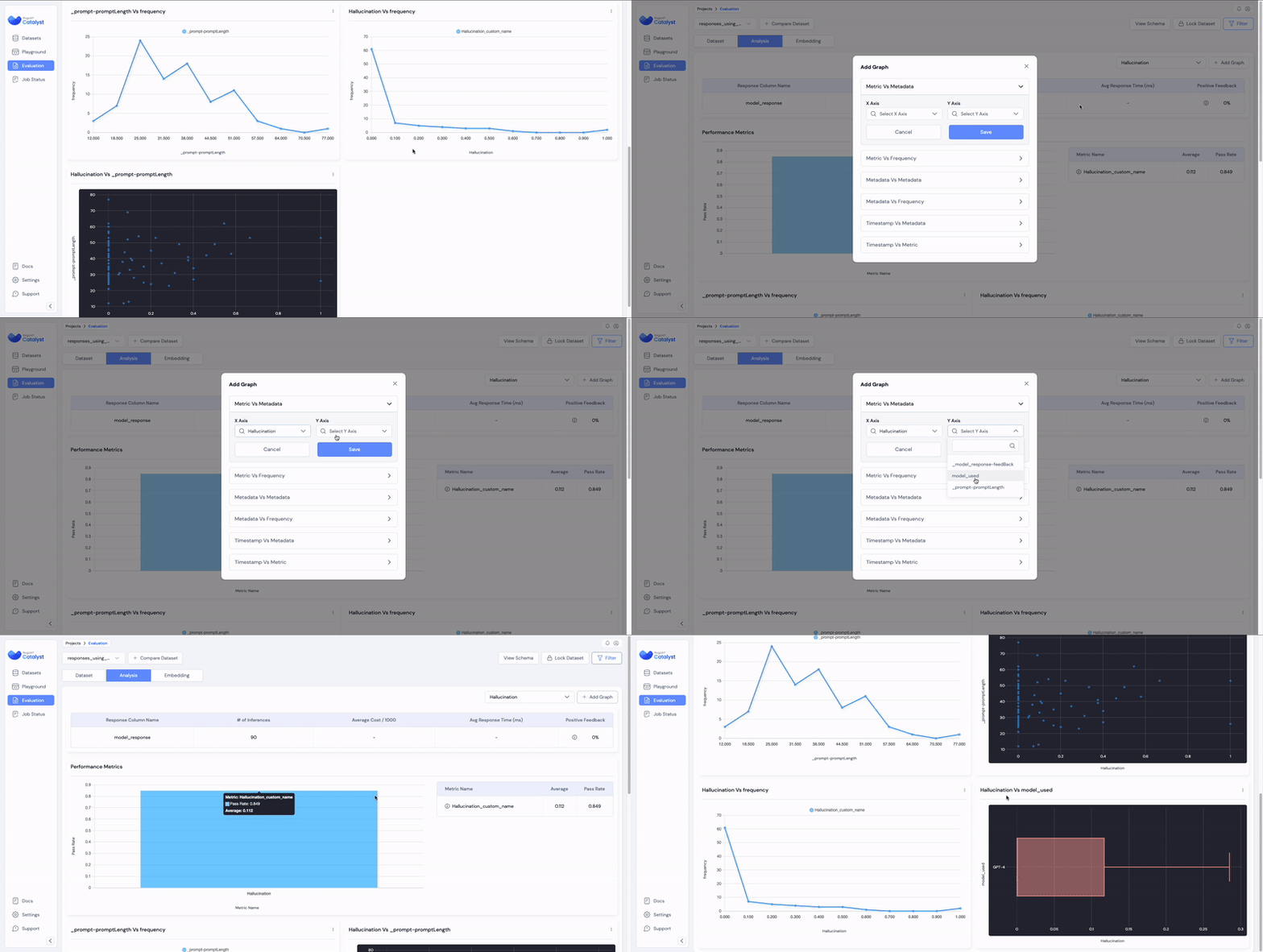
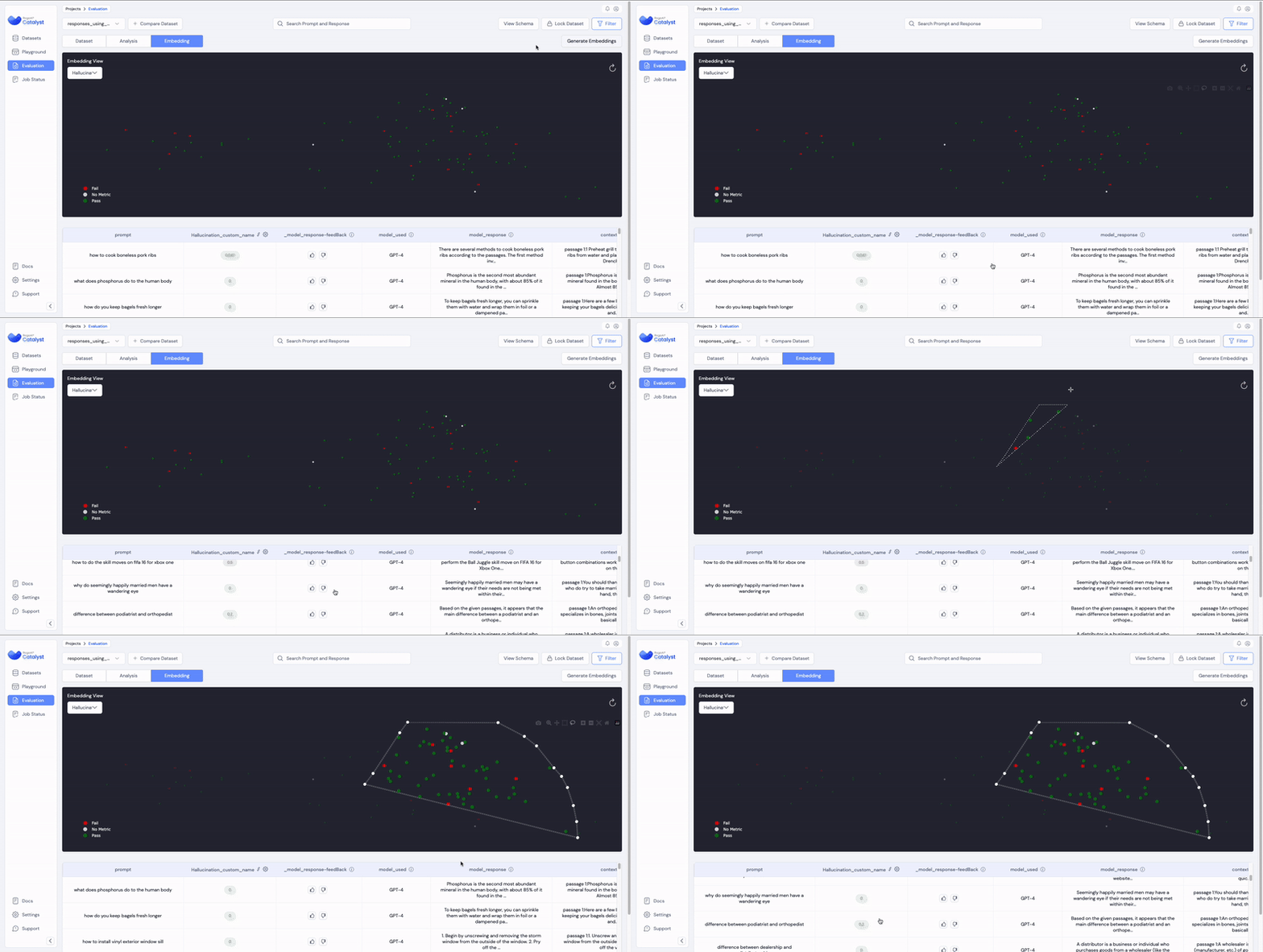

.gif?alt=media&token=cf5ed901-856f-44c4-bcca-54f0a64ae5b4)